TL;DR
- Your dashboard shows free GPUs and your 8-GPU job still sits in the queue. GPU fragmentation has left those free GPUs scattered across busy nodes instead of eight of them together on one.
- Rule out the ordinary causes of a Pending pod first: a device plugin that never registered, a quota, an autoscaler limit, or a request for more GPUs than any single node holds.
- The fix every scheduler and vendor publishes is bin packing, which chooses where the next job lands, so it cannot gather the GPUs that running jobs are sitting on. The consolidation features that do reach running jobs work by evicting them.
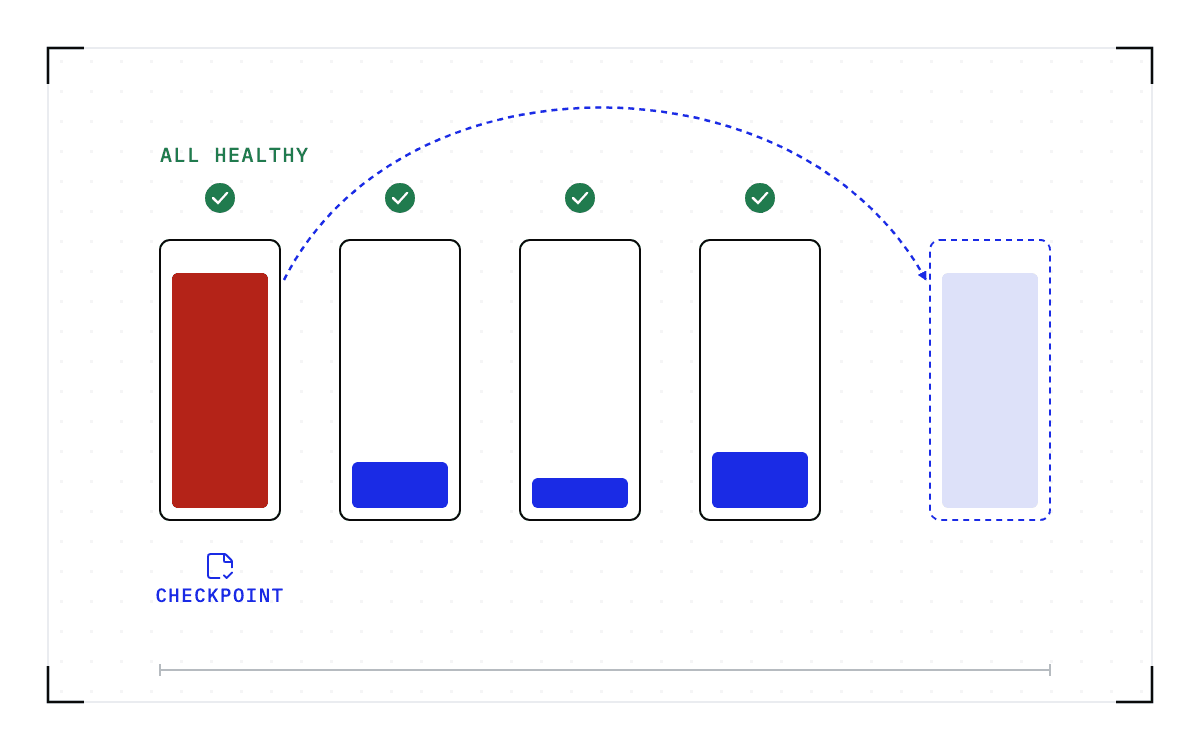
- Checkpoint a running job and it can move with everything it holds. The small jobs come off a half-empty node, that node comes back whole, and the 8-GPU job lands on it. The move costs a restore plus the work done since the last checkpoint.
- In this piece we walk through why the free count and the request do not match, what else leaves a pod Pending, and what bin packing reaches and what it does not. We also cover what consolidation does to a running job, and what changes when a job can be moved with its state.
The dashboard counts single GPUs and the queue asks for a block
The number on the dashboard and the request in the queue are not the same shape. Kubernetes allocates GPUs as whole-number resources on a node, and its device-plugin documentation is explicit about it. "Extended resources are only supported as integer resources and cannot be overcommitted. Devices cannot be shared between containers."
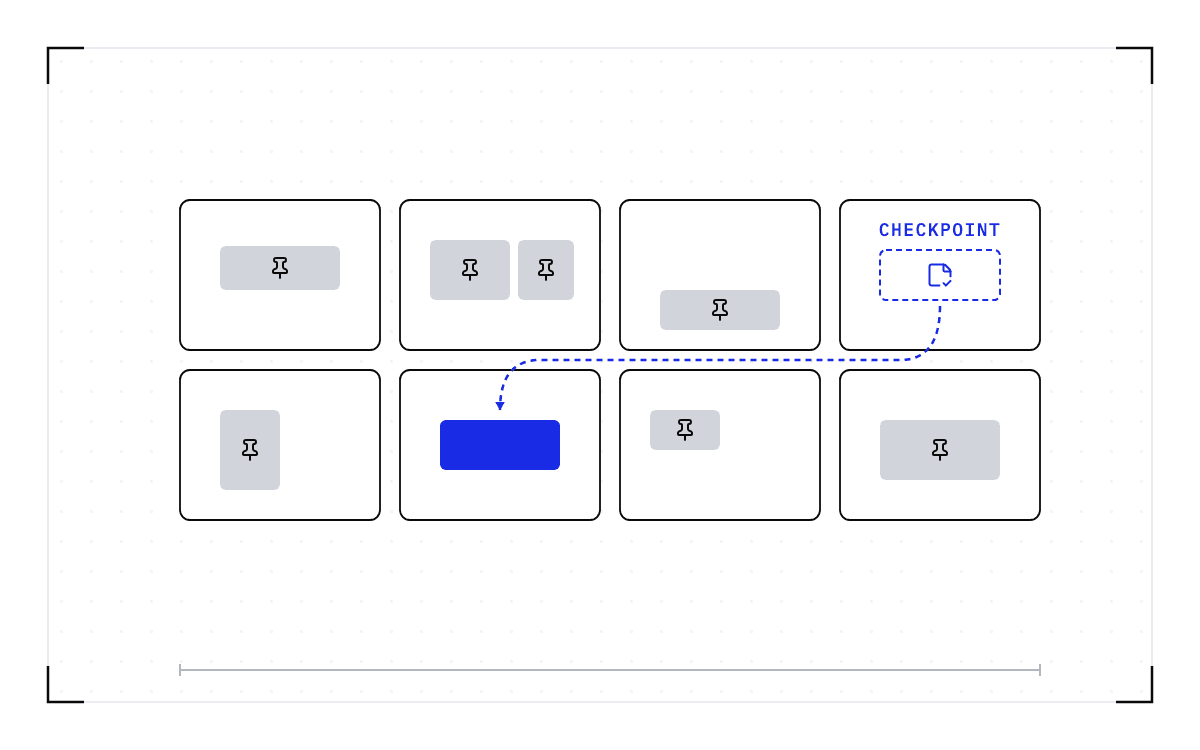
A large job needs its GPUs together. An 8-GPU training job wants them on one node connected by NVLink, so 8 free GPUs scattered across 4 nodes cannot satisfy it. Those GPUs are stranded capacity: available individually, but unusable for the waiting job.
Nothing has to go wrong for a cluster to reach that state. Jobs with different resource requirements start and finish at different times, releasing capacity on whichever nodes they used, so the free GPUs end up spread across nodes that are otherwise busy and no single node has enough of them together for the waiting job. That scattering is what GPU fragmentation means.
Four nodes with two free GPU slots each above a band for the nodes that are otherwise busy, above one box holding the same eight slots in an unbroken row for the training job that needs them together on one node.
Stranded capacity
8 free GPUs scattered across 4 nodes
an 8-GPU training job wants them on one node connected by NVLink
- available individually, but unusable for the waiting job
- nodes that are otherwise busy
The per-node split is illustrative.
Weng and co-authors measured it on a production cluster of roughly 6,200 GPUs and published the study at USENIX ATC 2023. In one measurement the cluster could not accept another task while about 500 of its GPUs sat unallocated. Across that cluster's roughly 1,200 nodes, around 92% had under one GPU free, while 49% of the pending tasks needed at least one whole GPU.
NVIDIA found the same pattern on a much smaller fleet. Its write-up on preventing fragmentation under the Volcano scheduler counts Kubernetes nodes holding 4 GPUs each, and only 18 of those nodes had all 4 GPUs free. Around 115 others had 3 GPUs free each, and a job that needs a whole node cannot use any of them. The two fleets are different sizes and were measured for different reasons, so neither set of figures describes the other.
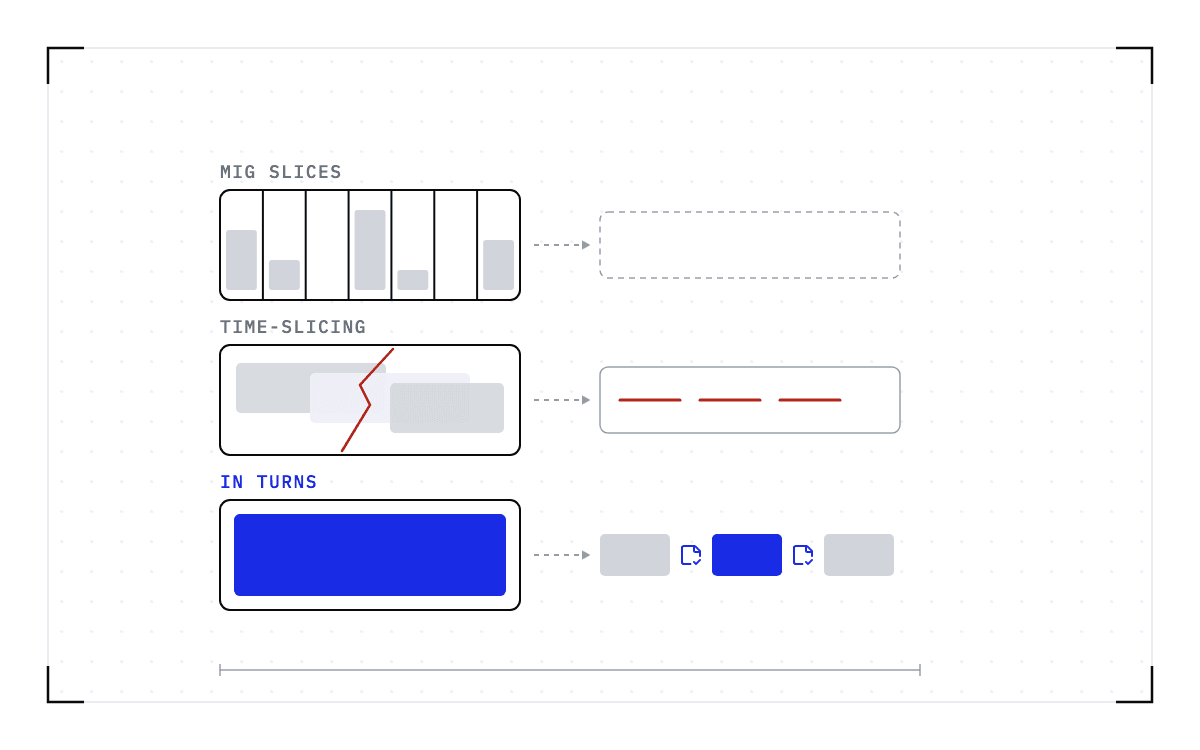
Letting jobs take part of a GPU strands more of them. Weng's abstract reports that "allocating partial GPUs can result in severe GPU fragmentation in large clusters, leaving hundreds of GPUs unable to be allocated", and Wu and co-authors, writing on defragmentation scheduling in 2025, put a range on it: "Partially allocated GPUs can convert 21 to 42% of un-allocated GPU resources into fragmentation." Those studies count fractional allocations, and the job you are trying to place needs whole GPUs, but the scattering that strands them is the same.
First, rule out the other reasons a pod stays Pending on a GPU node
A pod can sit Pending with no fragmentation anywhere, so check the ordinary causes before you blame the packing. One asker reported "0/10 nodes are available: 10 Insufficient nvidia.com/gpu". That message can come from a device plugin that never registered, a project quota, an autoscaler limit on the pool, or a request for more GPUs than any single node holds. NVIDIA's GPU Operator troubleshooting page covers that list, including the node where "the GPU pod gets stuck indefinitely in the Pending state" because it holds a mix of MIG slices and full GPUs.
If one of those is the cause, nothing below applies, because the fix is the configuration rather than the packing.
Every published fix chooses where the next job lands
GPU scheduling in Kubernetes has a standard answer for this, and every vendor below offers it: bin packing, which fills the nodes already partly used before it starts on empty ones. NVIDIA published its own result from putting bin packing into Volcano. "We boosted GPU occupancy to 90% by integrating Bin-Packing with Volcano Scheduler." In the same write-up the count of nodes with all 4 GPUs free rose from 18 to 214.
Run:ai makes the choice a setting: "When set to Bin-pack the scheduler will try to fill nodes as much as possible before using empty or sparse nodes". KAI Scheduler offers the same pair of goals, "either by minimizing fragmentation (bin-packing) or increasing resiliency and load balancing (spread scheduling)". Cast AI splits the work into "three technical layers: right-sized requests, MostAllocated scheduler scoring, and ongoing consolidation".
Asking for a device the newer way does not change what happens when the device is busy. Dynamic Resource Allocation, stable in Kubernetes since version 1.35, is plain about it on its own limitations page: "The high-priority Pod will remain in a pending state until the device becomes available, which happens when the conflicting Pod terminates or is manually deleted."
Bin packing recovers capacity, but some GPUs still cannot be allocated. Weng and co-authors built a fragmentation-aware scheduler for this exact problem and tested it on an emulated cluster of more than 6,200 GPUs drawn from the same trace, where it "reduces unallocated GPUs by up to 49%, resulting in the utilization of additional 290 GPUs". More than half of the unallocated GPUs were still there afterwards, under a scheduler built for the problem.
Every one of these decisions is made about a job that has not started yet, so a bin packer cannot bring scattered GPUs together while the jobs holding them are still running.
Consolidation on every vendor page means eviction
Consolidation is the feature that does reach running jobs, and Cast AI calls its third layer "ongoing consolidation". Each product that offers it also says what it does to the job standing in the way.
KAI Scheduler puts eviction into step two of its own published cycle. Step 1 is "Allocate, Schedule workloads to available resources. No evictions." Step 2 is "Consolidate, Repack workloads to reduce fragmentation. Temporary eviction only if the workload can be relocated." So relocating a workload there still begins by evicting it.
Run:ai says the same about its consolidation step, and adds preemption to it. "The Scheduler first tries to consolidate workloads into smaller number of nodes to make room for the currently scheduled workload," and "During consolidation, the Scheduler may preempt workloads from other queues".
The Kubernetes descheduler names the operation outright: "Descheduler, based on its policy, finds pods that can be moved and evicts them." Its bin-packing strategy, HighNodeUtilization, "evicts pods from the nodes in the hope that these pods will be scheduled compactly into fewer nodes", and the README adds that the descheduler "does not schedule replacement of evicted pods but relies on the default scheduler for that".
Karpenter, which removes the node rather than repacking it, writes out every step. It adds a taint "to prevent pods from scheduling to it", pre-spins any replacement nodes, then begins "evicting the pods on the node with the Kubernetes Eviction API to respect PDBs" and waits "for the node to be fully drained" before it deletes the node. That pipeline cordons, drains, and deletes the node.
The operation four products publish and what each does to the running job: KAI Scheduler Consolidate, temporary eviction; Run:ai consolidation, may preempt workloads from other queues; descheduler HighNodeUtilization, evicts them; Karpenter removes the node, cordons, drains, and deletes.
What consolidation does
| Product | The operation | What happens to the running job |
|---|---|---|
| KAI Scheduler | Consolidate | temporary eviction |
| Run:ai | consolidation | may preempt workloads from other queues |
| descheduler | HighNodeUtilization | evicts them |
| Karpenter | removes the node | cordons, drains, and deletes |
The names differ and the operation is the same. None of the scheduler and consolidation products above can migrate a running job to a node that fits, so whatever the pod was holding in GPU memory goes when the pod goes, and if you want a whole node back you wait for the jobs on it to finish rather than defragmenting a cluster that is doing work.
The operation people keep asking for is the one nobody ships, and every one of those requests on the trackers is still open. One asks for "consolidating pods into the minimal set of hardware while using fractional gpu sharing". Another describes the state a cluster reaches on its own: "Inference workloads or other workloads often can leave a cluster jagged with no room for a full node."
Slurm has the same gap, and its users ask for the same missing operation. A user on the Slurm list asks "Is there a way for the administrator to achieve preferring full nodes?", and another describes what happens without it: "If the user wants to submit a job requiring 4 GPUs, it cannot run due to fragmented GPUs."
Moving the small jobs with their state gives back a whole node
What blocks the move is the state inside the job. A fully initialized serving worker holds the model weights, the CUDA graphs it captured at startup, and the key-value (KV) cache for every session in flight, all in GPU memory, and it has process and driver state besides. A scheduler can kill that worker and it can start another one somewhere else, but neither operation carries the state across.
Draining preserves the sessions by waiting for them to finish. The worker takes no new requests and finishes the ones it has, so its GPUs stay occupied until the longest session ends, and if you start a replacement while it drains you pay for two workers in the meantime.
Checkpointing means writing down the state of a running job so it can be brought back later, and a checkpoint changes what you can do with the half-empty nodes. Save the state of each small job, restore each one on other capacity, and their original nodes are available in full again, so the 8-GPU job lands on one of them. Nothing was killed to free it, and no job restarts from the beginning.
What moving a running job costs
Something has to start the move, and it is not the scheduler. Cedana does not decide where a job goes. That decision belongs to the scheduler, and no scheduler named on this page calls us today, so an operator's policy or an agent starts the move.
A policy pairs a trigger, a filter that says which workloads it applies to, and an action. Heartbeat checkpointing takes a checkpoint on a schedule, the way a cron job does, and an agent can trigger a checkpoint or a restore as well.
The job comes back as of its last checkpoint, so the move takes a restore plus repeating whatever work it did after that checkpoint was taken. Restore time follows the size of the checkpoint, meaning how many bytes have to move, not the parameter count.
The restore also has to land on a node that matches the one the checkpoint came from. A checkpoint records the GPU, driver, engine and model versions it was taken against. If any of them changes, the checkpoint is invalid and the workload cold-starts instead.
How many nodes a job spans decides whether you can move it today. Multi-node means one job runs across more than one machine, with its GPUs coordinated throughout execution, and the small jobs you would move out of the way in a defragmentation pass usually fit on a single node instead. The single-GPU and multi-GPU-on-a-single-node tiers ship in production today. Multi-node, where a single workload spans hundreds or thousands of GPUs across many nodes, is in design partnership with leading enterprises and neoclouds. If your jobs span nodes and this is the case you need solved, talk to Cedana about a design partnership.
Whether a node comes back whole depends on whether the jobs sitting on it can move with what they hold. Cedana is automated GPU checkpointing and migration infrastructure that increases the useful work your GPUs deliver. We save the state a running job holds and bring it back on compatible hardware, so packing a cluster tighter does not have to mean killing the work already on it. The GPUs your dashboard counts as free stay scattered until the jobs around them can move.
Related:
- What would a GPU scheduler do differently if it could move running jobs?
- Why a healthy inference worker can still be in the wrong place
- Does disaggregated serving remove the need to move GPU workers?
- H100 for prefill, H200 for decode: the mismatch you pay for twice
- Sharing GPUs without fixed MIG slices
Common questions
Why does my cluster fail to place a job that needs several GPUs together, even though the total free GPU count looks like enough?
The free GPUs are not next to each other. Jobs with different resource requirements start and finish at different times, releasing capacity on whichever nodes they used, so no single node has enough free GPUs together for the waiting job. The schedulers and vendor features built for this choose where the next job lands, and they cannot touch the jobs already running on the half-empty nodes, while the consolidation features that do reach those jobs evict them. Checkpointing the running jobs and restoring them on other capacity frees a whole node without killing anything, at the cost of a restore plus the work done since the last checkpoint.