TL;DR
- Linux cannot solve a memory shortage by pausing your process, because a paused process still holds every byte it held a second earlier. Once the OOM killer has chosen its victim, SIGKILL leaves no window to save anything.
- The controls people reach for warn you earlier or change which process gets picked. Every one of them still ends a running process and loses the computation inside it.
- A checkpoint taken while the job is still running changes what the kill costs you. The job gives its memory back without giving up its work, then resumes at its last checkpoint on a node with more memory.
- In this piece we walk through how long people have been asking for a pause, why pausing frees nothing, what the controls around the OOM killer can and cannot do, and why a machine can freeze before the killer fires. Then we cover what changes when the job is saved before it is killed.
How long have people been asking for a pause?
People have been asking since at least 2013, and the answer they got then is close to the answer the kernel gives now. On 10 June that year someone asked on Server Fault for "Automatically suspend/hibernate a process when too much memory taken". The asker was running batches "of about 1k tasks (each batch has a total expected time of a month to be finished)", with memory "ranging from several megabytes to ~8GB; usage may grow slowly or quickly", and wanted a task suspended when it grew rather than killed.
The top answer gave the technique its name and then said the kernel did not have it: "What you are referring to is process checkpointing. There is some work in the later kernels to offer this (in conjunction with the freezer cgroup) but its not ready yet."
Why does pausing not free anything?
A paused process still holds every byte it held a second earlier, so suspending the victim leaves the machine as short of memory as it was before. When a machine runs out of memory and the kernel cannot reclaim enough to keep operating, it invokes the out-of-memory killer, and ending a process is the one action guaranteed to hand memory back.
At the point of exhaustion, the only choices are to end the process or to save its state and then end it. A pause is not one of them, because it changes what your process is doing without changing what it is holding.
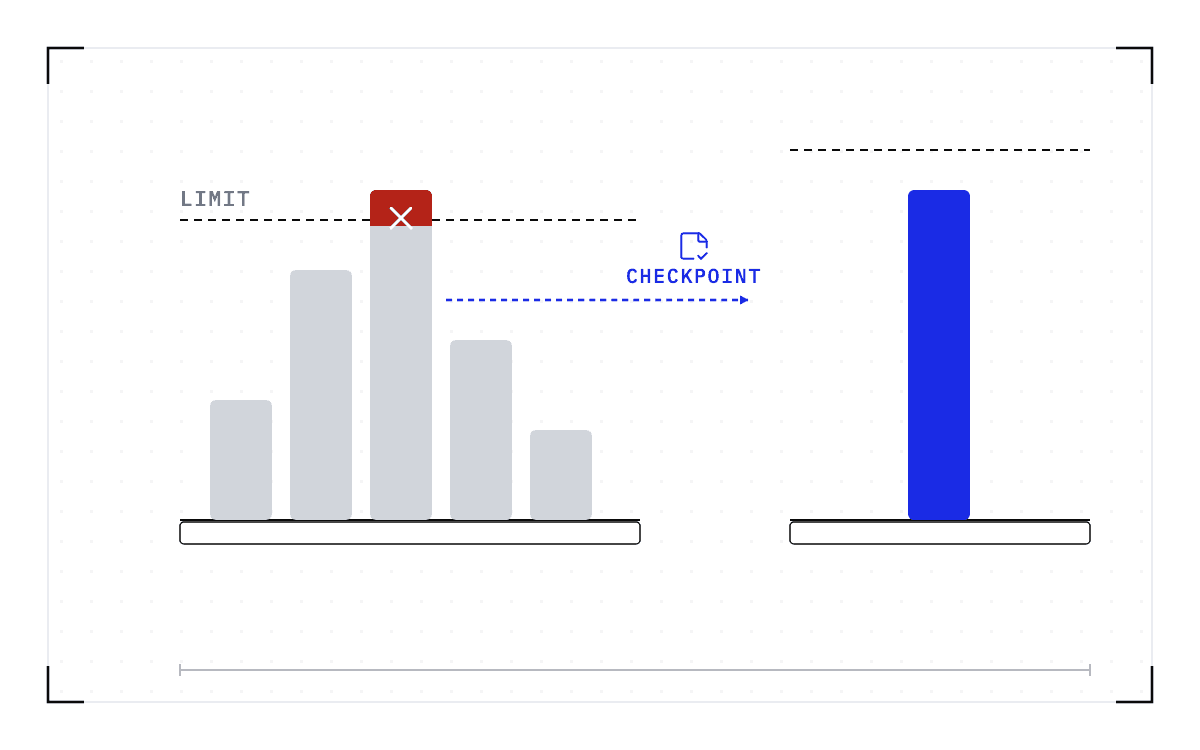
Three branches at the point of exhaustion: end the process, save its state and then end it, and a greyed pause branch, because a paused process still holds every byte it held a second earlier.
The choices at the point of exhaustion
At the point of exhaustion the only choices are to end the process or to save its state and then end it; a pause is not one of them, because a paused process still holds every byte it held a second earlier.
Can you prevent the OOM killer, or only warn and delay it?
You can be warned earlier and you can change which process gets picked, but you cannot keep the work, because every control below still ends a running process.
Raw Linux cgroups, the kernel feature that caps and accounts for what a group of processes may use, let you register for a memory threshold notification and act before the limit is hit. That is the hack the 2013 answer went on to describe: a cgroup carrying the freezer and memory subsystems, with a threshold set on cgroup.event_control.
A container on Kubernetes gets nothing like that notification. The request for one, titled "Make OOM not be a SIGKILL" and asking for "SIGTERM instead (with a grace period or 100m before reaching the limit)", was opened in January 2017 and was still open on 6 September 2026 with 71 comments.
Once the kernel has decided, there is no window left at all, because SIGKILL cannot be caught, blocked, or ignored. Your process gets no last instruction, so whatever you wanted it to do on the way out has to have happened before the decision.
Four controls act earlier than the kernel or steer its choice, and all four stop in the same place: earlyoom, systemd-oomd, oom_score_adj, and Ray's memory monitor.
| The control | What it does | What happens to the work |
|---|---|---|
| earlyoom | It "checks the amount of available memory and free swap up to 10 times a second" and gets there before the kernel does, sending SIGTERM to the process using the most memory and holding SIGKILL for a lower threshold | Handling SIGTERM lets a process shut down in an orderly way, and the computation it was in the middle of is still lost |
| systemd-oomd | The same idea inside systemd, driven by pressure metrics | The work is lost the same way |
| oom_score_adj | It steers victim selection toward a process you are more willing to lose | Whichever process the kernel picks instead still ends, and its work ends with it |
| Ray's memory monitor | It kills Ray's own worker when node memory crosses a threshold, one layer above the kernel | The task is retried from the beginning, and Ray's documentation says that "the default memory monitoring system makes no guarantees." |
Every row decides when a process is killed or which process is chosen, and in every row the work still ends. What happens to the memory request, and why raising it does not stop the pattern, is covered in Why everyone over-requests memory on a shared cluster.
Why the machine freezes instead of the killer firing
Sometimes the killer never gets its chance, and a whole set of threads describes the same night. An administrator on Unix & Linux Stack Exchange has a system that freezes, in his words becoming extremely slow, for hours or even days instead of killing anything, and his longest freeze ran seven days before he reset the machine. Another finds that "my linux box UI freezes completely for a very long time" and that the killer acts only when he triggers it by hand. On the Slurm users list, processes that have hit their memory ceiling and are stuck in D state "cause the system to become wedged". On the NVIDIA forums, "the system is often so starved for memory that the kernel itself struggles to run the OOM killer. SSH hangs, the UI freezes".
The freeze happens because killing is the kernel's last resort, not its first. Before it kills anything it reclaims everything it can, and earlyoom's own page describes the order: "It will swap out the desktop environment, drop the whole page cache and empty every buffer before it will ultimately kill a process." A machine in that state is not idle. Every process that touches a page the kernel just dropped waits for the disk to bring it back, the kernel drops something else to make room, and the loop runs for as long as reclaim keeps finding a page to free. The killer fires only when reclaim fails outright, and on a machine with swap and a large page cache that point can be hours away.
Three things make the kill come sooner, and all three end a process.
- Trigger the killer yourself. The kernel's SysRq guide lists the f key as "Will call the oom killer to kill a memory hog process, but do not panic if nothing can be killed", and you send it from a shell by writing f to /proc/sysrq-trigger. That is the manual step the second asker above landed on, and it needs a shell that still answers.
- Run a killer that watches from user space. earlyoom, in the table above, reads memory and swap before the kernel does, and "By default if both are below 10%, it will kill the largest process (highest oom_score)". It can also hand the job to the kernel: "You can make earlyoom trigger the kernel oom killer (echo f > /proc/sysrq-trigger) by passing the --kernel-oom flag." systemd-oomd "uses cgroups-v2 and pressure stall information (PSI) to monitor and take corrective action before an OOM occurs in the kernel space", and when it acts it "will select a cgroup to terminate, and send SIGKILL to all processes in it".
- Set the threshold with care. Too low and the freeze comes back. Too high and a job that would have fit is killed: one report on the NVIDIA forums describes a vLLM container that had started countless times since May being, in the poster's word, "intercepted" by earlyoom. The Slurm thread above was pointed at a different fix, turning off transparent huge page defragmentation, which had cleared a similar case elsewhere and addresses one cause of the D state rather than the freeze in general.
Each of these gets you the machine back sooner. What you do not get back is the work inside the process that was killed, and the rest of this page is about that.
What answer keeps the work?
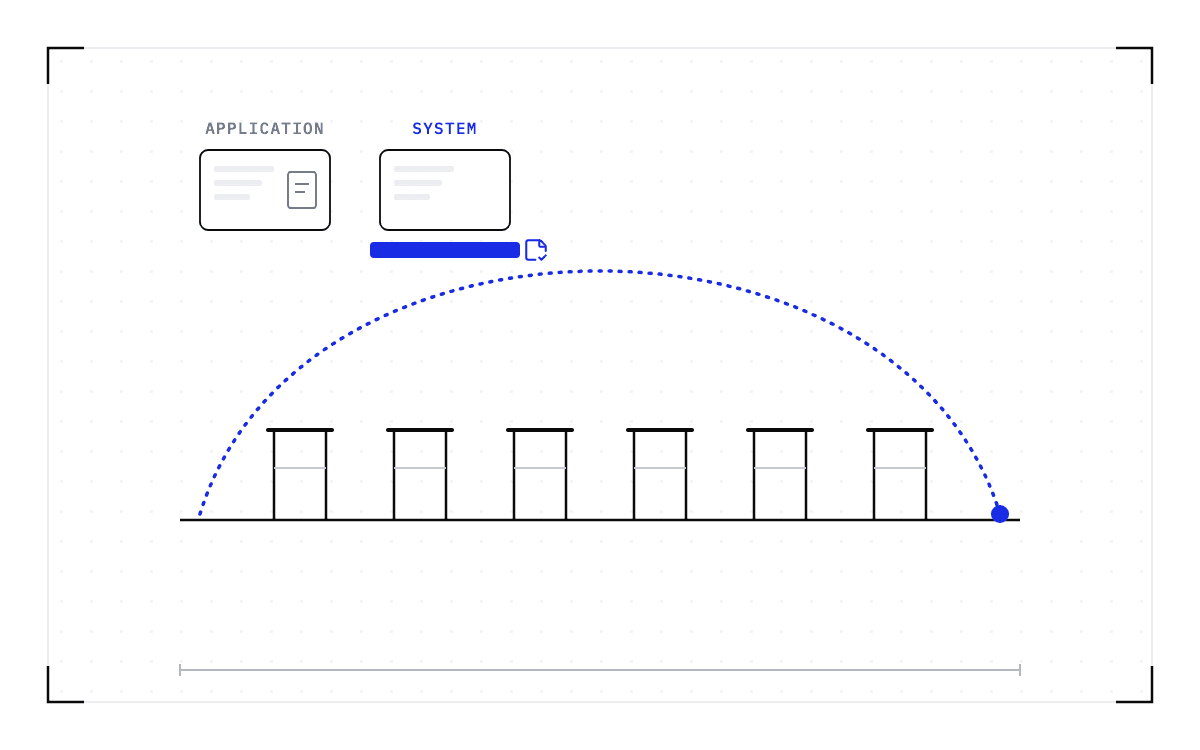
Checkpointing keeps the work, and it is the technique the 2013 answer named: writing down the state of a running job so it can be brought back later. A job saved that way can give up its memory without giving up its work. What the operating system cannot do, a checkpointing policy you install can. The sequence runs in four steps, and the saving happens before the kernel's decision, not after it.
- Detect memory pressure, before the limit is hit.
- Checkpoint the victim while it is still running, instead of waiting for the kill.
- Free the memory.
- Resume the victim at its last checkpoint, on a node with more memory.
Nothing about victim selection changes, so whatever picks the process today, the kernel or the kubelet, the agent Kubernetes runs on every node, can go on picking exactly the one it would have picked. What changes is that a checkpoint already exists when it does, so the work you lose drops from everything since the last application save to the time since the last checkpoint, and the job is down for the length of the restore.
The four-step save with the kernel's decision marked between the second and third steps: detect memory pressure, checkpoint the victim while it runs, free the memory, resume at the last checkpoint.
The save before the kernel's decision
Detect memory pressure, before the limit is hit.
Checkpoint the victim while it is still running, instead of waiting for the kill.
Free the memory.
Resume the victim at its last checkpoint, on a node with more memory.
What that looks like for a job killed on a shared cluster, and how to read the record afterward, is covered in What happens when a cluster job runs out of memory.
That sequence is what we build at Cedana, and we ship two policies for it. The first waits until the job fails and then resumes it at its last checkpoint after moving it to a compatible node with more memory. The second moves the workload to a node with the same GPU model and more free memory before it fails. Either way, the state we save includes GPU memory.
The workload has to come back on a compatible node. A checkpoint records the GPU, driver, engine and model versions it was taken against. If any of them changes, the checkpoint is invalid and the workload cold-starts instead.
Checkpointing does not create memory. It moves the work to where the memory already is. Cedana is automated GPU checkpointing and migration infrastructure that increases the useful work your GPUs deliver. For a job under memory pressure, that means the memory goes back to the machine and the hours already computed do not go with it. The next time the OOM killer picks your process, the machine still gets its memory back, and your job continues from its last checkpoint.
Related:
- What happens when a cluster job runs out of memory
- Why everyone over-requests memory on a shared cluster
- System-level vs application-level GPU checkpointing: the category and the bar
- What happens to a GPU pod when Kubernetes ends it
Common questions
Can a process pause or save its state instead of being killed outright by the OOM killer?
Pausing does not help, because a paused process still holds every byte it held a second earlier, so suspending the victim leaves the machine as short of memory as it was before. At the point of exhaustion, the only choices are to end the process or to save its state and then end it. Cedana checkpoints the process before the kill, on a policy you set, and resumes it at that checkpoint on a node with more memory.
Can I get a warning before the OOM killer, or a Kubernetes eviction, kills my process?
On a machine you control, you can be warned. Raw Linux cgroups let you register for a memory threshold notification and act before the limit is hit, and the earlyoom daemon "checks the amount of available memory and free swap up to 10 times a second" and sends SIGTERM to the process using the most memory before the kernel gets there. A container on Kubernetes gets nothing like that notification, and the request for a signal before the kill has been open since January 2017. Handling SIGTERM lets a process shut down in an orderly way, but the computation it was in the middle of is still lost, unless something used the warning to take a checkpoint first.