TL;DR
- DCGM has flagged a GPU on a node that is running your work, and you have to decide what happens to that job.
- Every documented response except ignoring the error ends the job, because a drain, a reset, a reboot or a replacement all take the hardware away from it. A cordon is the exception, and all it does is stop new work from landing.
- Nothing in DCGM's thresholds, NVIDIA's Xid catalog or the Kubernetes device plugin keeps the work in flight. A false alarm costs you the same run that a real fault does.
- What changes the cost is the order you act in. Checkpoint the job while it is still running, restore it on a healthy node, and then cordon, drain and reset the degraded one.
- In this piece we walk through what DCGM's counters and Xid codes are telling you, the four responses NVIDIA's catalog names, and what Kubernetes and Slurm do with a flagged GPU. We also cover the two warnings you can sit on, and how to run the same steps in the other order.
What DCGM's ECC counters and Xid codes tell you
The counters grade how bad the error is, and they say nothing about the job sitting on the card. A correctable ECC error is one the hardware detects and repairs by itself, and the workload carries on. DCGM counts it as a single-bit error, an SBE. An uncorrectable error cannot be repaired, so the data is lost, and it counts as a double-bit error, a DBE. Both counts are kept per GPU while the job runs, alongside thermals, power draw, and row-remap counters, with the driver's Xid errors beside them.
DCGM grades each reading as either a warning or an error, and the difference between them is whether the work in flight is already affected. A warning means the issue will not prevent current work from completing. An error is critical because the work in flight is likely compromised or interrupted, and those situations "usually indicate the need for job termination and GPU health analysis." The next step DCGM's own source file stores for a volatile double-bit error is "Drain the GPU and reset it or reboot the node."
The background health checks DCGM runs trip at fixed points:
- One or more volatile double-bit errors.
- One or more pending page retirements.
- 63 or more retired pages on a GPU over its lifetime.
- More than 15 of those caused by double-bit errors, one of them in the last week.
- A row remapping failure.
None of that is a rule for when to move a workload, and no source gives a count of correctable errors after which work should move. Crusoe's engineering blog gets closest, saying that clustering correctable errors usually means the high-bandwidth memory is beginning to fail. "If you wait for uncorrectable errors, you've already impacted a workload."
If your question is what a particular code means, or whether the card is dying, NVIDIA's Xid catalog answers that. The remaining decision is what to do with the running job.
NVIDIA's catalog names four responses to a warning
Every code in the Xid catalog carries a column headed "Resolution Bucket (Immediate Action)", and the values across the table are IGNORE, RESTART_APP, RESET_GPU, RESTART_BM, RESTART_VM, and CONTACT_SUPPORT, plus a few per-code workflows. Those amount to four responses: ignore the error, restart the application, reset the GPU, or reboot or replace the node.
Every response except ignoring the error ends the job, including an application restart. On Xid 94, a contained memory error, "these errors are contained to one application, and the application that encountered this error must be restarted."
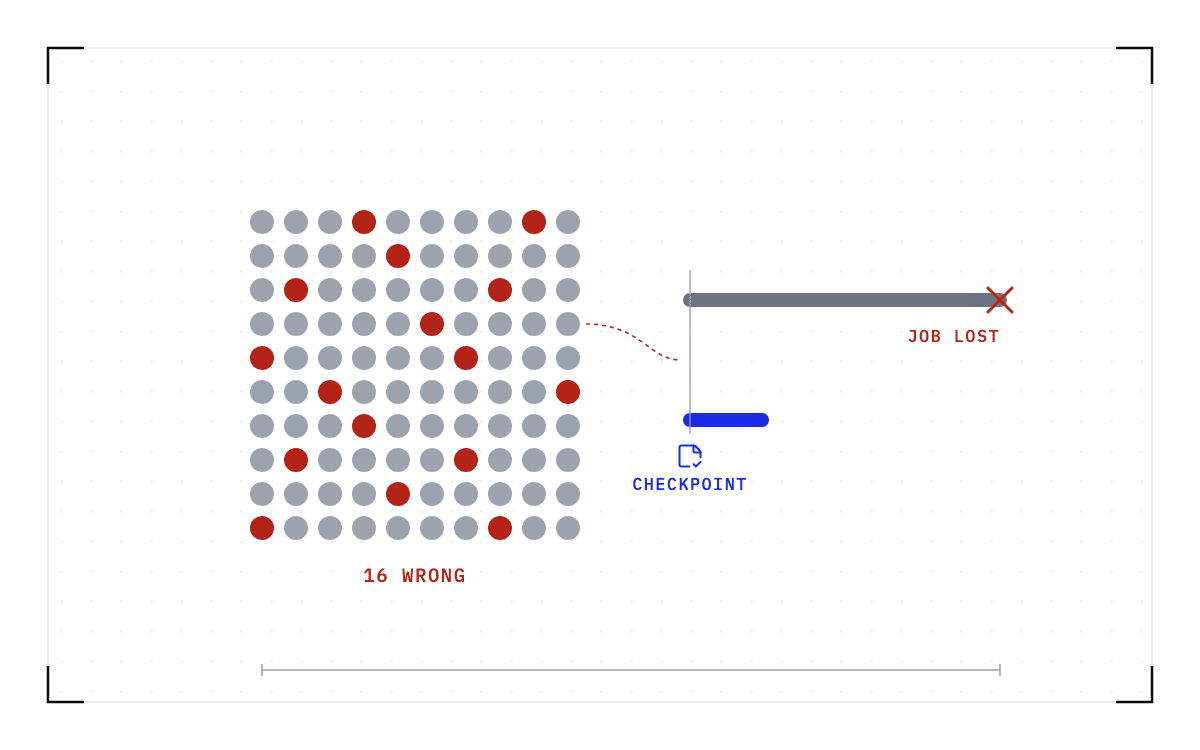
A cordon is the one action that leaves the running job alone, because all it does is stop new work from landing on the node. A drain, reset, reboot, or replacement ends the job on that hardware, so the order you act in decides what the alert costs you.
Of the four responses shown, ignoring the error does not end the job and restarting the application, resetting the GPU and rebooting or replacing the node all do. Below them, a cordon does not end the job; it stops new work from landing on the node.
The responses and the cordon
Three of the four responses shown end the job; the cordon, which is not one of them, does not.
Kubernetes' device-plugin health check leaves the pod running on an unhealthy GPU
Marking a GPU unhealthy changes what Kubernetes will schedule next, not what is already running on the card. The kubelet decreases the allocatable count so no new pods land on the device. The device-plugin documentation then says what becomes of the pod that is already there: "Pods that were assigned to the failed devices will continue be assigned to this device." And, "It is typical that code relying on the device will start failing and Pod may get into Failed phase if restartPolicy for the Pod was not Always or enter the crash loop otherwise."
So the flagged GPU keeps its job until the job breaks on it, because the unhealthy mark is an allocatable-resource change and not an eviction of the running pod. An operator on the device plugin's tracker puts the same thing plainly: "A device being marked as unhealthy does not have any impact on a Pod that has the device attached."
A false alarm ends the job the same way a real fault does
Health checks are wrong sometimes, and being wrong costs you the same run. SkyPilot's issue tracker gives an example: "an SSH health probe timing out once is common, and it kills a perfectly healthy long-running job." A second report shows the sequence: the status fetch failed after retrying for 80.2 seconds, the controller tried to recover the job by restarting it, and the relaunch killed the live solve.
An open request for comment there asks whether a managed job should be cancelled and relaunched at all "when the only thing that failed is the controller's ability to reach the job, while the cluster and the job are healthy". Neither issue has a fix.
The repair can be wrong too. NVSentinel's tracker records the loop: "We have observed remediation loops continually occur with both GPU resets and reboots where a node will retry the same remediation action which does not resolve the underlying fault." A second issue there describes a fatal health check whose own recommended action is none, with the drain running anyway. The repair can also do nothing. In one report on the GPU Operator's tracker, nvidia-persistenced kept a handle on the GPU and blocked the reset, which ran only after that process was killed.
Sometimes no signal arrives at all. Askers describe GPUs that throttle, stall, or return wrong numbers while, in one asker's words, "no obvious counter (clocks, temps, ECC, power, PCIe) reports distress". A wrong alert and a right one cost the same today, and so does no alert.
You cannot make the checks right, but you can change what a wrong one costs you. If the job is being saved on an interval while it runs, before any alarm fires, a relaunch costs a restore plus the work since the last checkpoint, whether the alarm was right or wrong, instead of the run.
Two warnings you can sit on
A pending row remap and Xid 63 are the two warnings that come with published advice to leave the job alone, and they are one event seen twice: the faulty memory row will be replaced at the next reset, rather than interrupting the running job. The catalog's immediate action for Xid 63 is IGNORE, and the catalog reads "Applications can continue to be run until the reset can be performed."
The job is safe for exactly as long as nobody touches the hardware, because the GPU still needs its repair. For that repair, Modal recommends the usual sequence: "Drain/cordon the node, wait for all work to complete, and reset." The repair is postponed, not avoided.
What the fleet tools do with a warning today
The tools that watch your fleet protect the other jobs, not the one on the flagged card. NVIDIA's NVSentinel describes its repair sequence: it "detects faults as they happen, protects jobs by cordoning and draining the affected node, and remediates it with a GPU reset or a reboot". Its architecture diagram labels the component that drains the node "Node Drainer (Workload Eviction)".
Kubernetes' warning bus works the same way. Node-problem-detector publishes and never acts, and "Remedy systems observe events and/or node conditions emitted by the node-problem-detector and take action to return the Kubernetes cluster to a healthy state." Those remedy systems evict, reboot, or delete. Draino, its usual companion, cordons matching nodes immediately and drains them "after a configurable drain-buffer time", 10 minutes by default. That delay is the only control anyone has built here.
Slurm gives you DRAIN and DOWN, which are the two ends of the same choice. Its scontrol page defines DRAIN: "Indicates that no new jobs may be started on this node. Existing jobs are allowed to run to completion, leaving the node in a DRAINED state once all the jobs have completed." DOWN is "Stop all running and suspended jobs and make the node unavailable for new jobs."
So a 3-day training run under an ECC warning either finishes on failing hardware or dies now. An application-level checkpoint leaves you in the same place, because the training code still has to save its state before the process stops and the node is drained.
Together AI built the detection and the repair actions, then put a person between them, and said why: "Your training checkpoints and inference replicas are too valuable to risk on automated drains."
Run the same steps in the other order
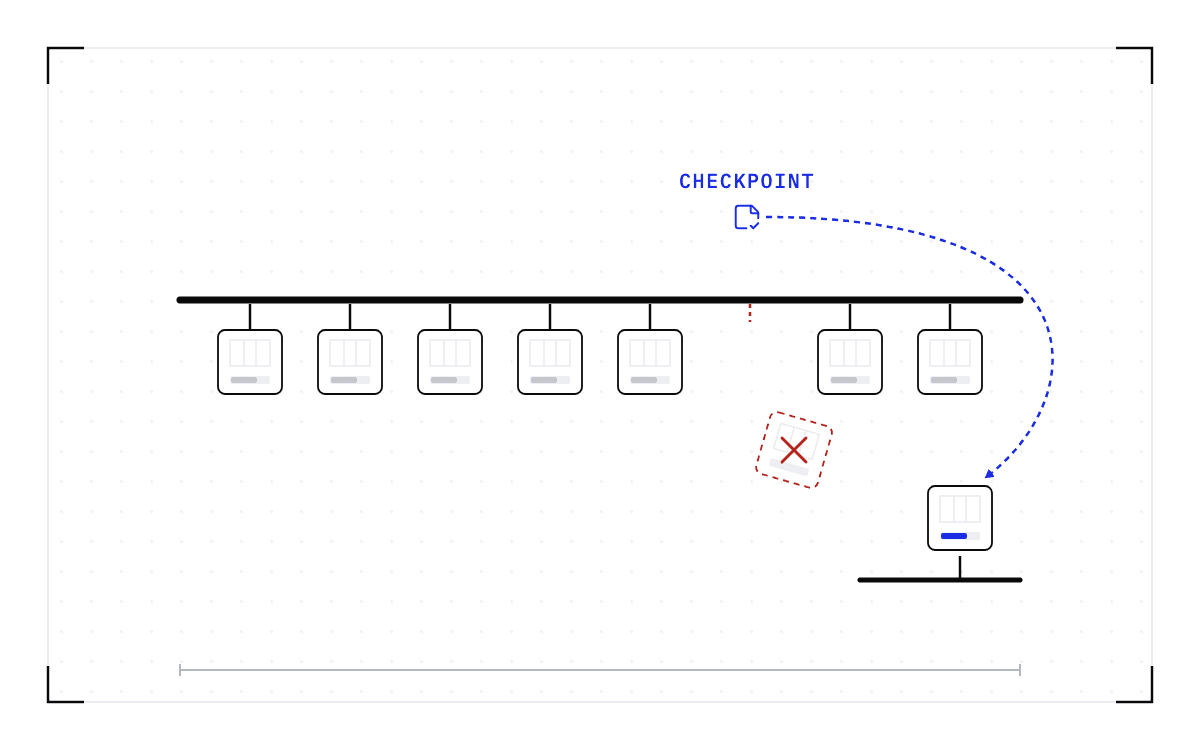
While the errors are still correctable and the job is running normally, checkpoint it below the application, restore it on a healthy node, then cordon, drain, and reset the degraded one. The hardware steps do not change, but they now run after the job has moved, so acting on the alert costs the restore time instead of the run.
What the runbook does today is cordon, drain and reset, which costs the run. In the other order the same three steps move two places to the right, with checkpoint it and restore it on a healthy node in front of them, which costs the restore time.
The same steps in the other order
The three hardware steps are the same in both rows; in the second they run two places later, after the job has moved.
Below the application means the workload takes no part in it. That is what we build at Cedana. Cedana preserves the entire workload state (CUDA context, KV cache, file system, network, scheduler), so workloads automatically resume on a new instance as of the last checkpoint.
An uncorrectable error changes which checkpoint you use. The data it hit is lost, and DCGM grades the work in flight as likely compromised, so a checkpoint taken after that point saves the damage along with the job. What goes to the healthy node is the last checkpoint taken before the error.
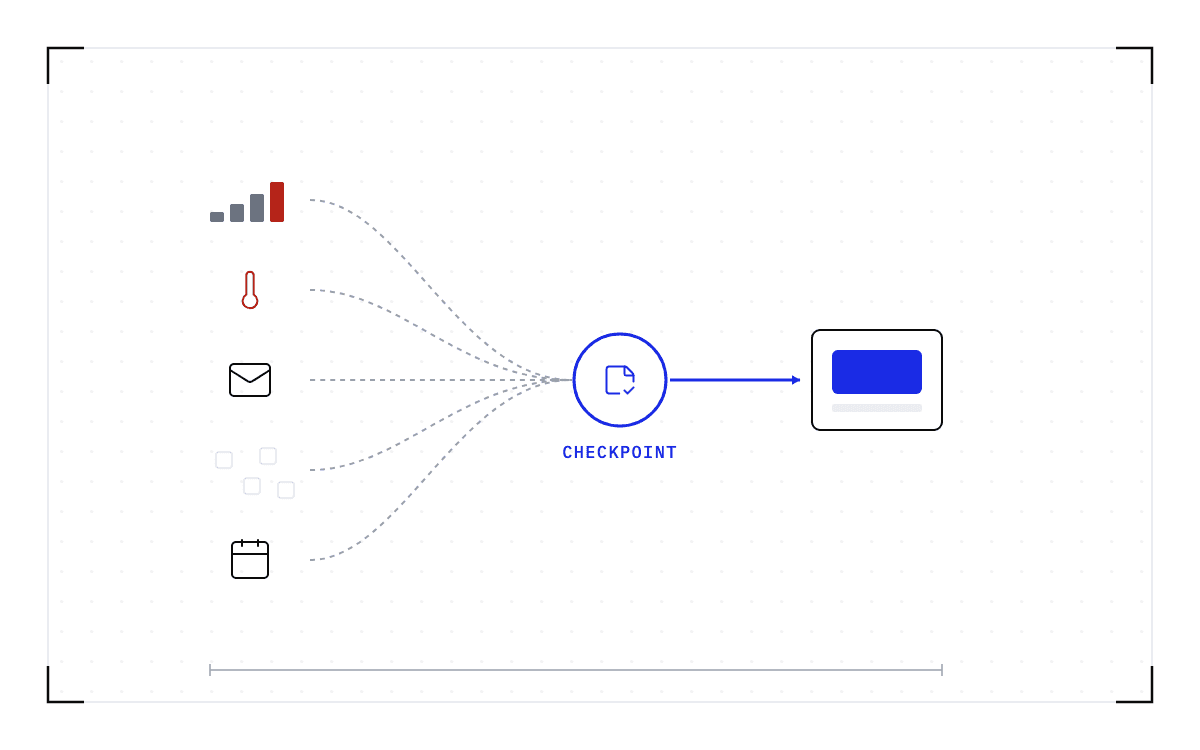
Cedana's control plane consumes DCGM, Prometheus, and NVSentinel events, so it sits under the alerting stack you already run. It does not raise the alert or supply a signal your counters are missing. What it changes is what the alert costs you. Heartbeat checkpointing takes a checkpoint on an interval you set, with no admin present. The table's last column says which rows run now and which are the design. Where a row runs today, an operator or an agent starts the move.
| The signal | What the runbook does today | What it costs the running job | The policy that saves it instead | Runs today or the design |
|---|---|---|---|---|
| A single correctable ECC error | Log it and keep watching | Nothing | Nothing beyond the heartbeat | Runs today |
| A rising ECC or Xid trend | No count says when to act | Nothing yet | An ECC or Xid trend triggers migration ahead of the failure. | Designed, not yet shipped |
| Repeated uncorrectable ECC, or a driver crash | Quarantine or cordon, then drain | Every job on the node | Restore the last checkpoint from before the error on a healthy node, then drain | Runs today |
| A pending row remap, Xid 63 | Ignore it until the next reset | Nothing until the reset | Move the job, then reset when it suits you | Runs today |
| A thermal excursion | Alert on a threshold you set | Slower work now, a cordon later | A thermal throttle moves the worker off the hot rack. | Designed, not yet shipped |
| A workload short of memory | Nothing in this runbook | The kill | Move it to a compatible GPU with enough memory first | Runs today |
What a restore needs to work
A checkpoint records the GPU, driver, engine and model versions it was taken against. If any of them changes, the checkpoint is invalid and the workload cold-starts instead. So the node you restore onto has to match those versions, and it is not the one you are about to drain.
Work done since the last checkpoint has to be redone, and you set that interval as a policy.
Support also depends on how many nodes the job spans. The single-GPU and multi-GPU-on-a-single-node tiers ship in production today. Multi-node, where a single workload spans hundreds or thousands of GPUs across many nodes, is in design partnership with leading enterprises and neoclouds. If your jobs span nodes and this is the case you need solved, talk to Cedana about a design partnership.
None of this makes the flagged GPU healthy. It still needs its reset or its reboot, and NVIDIA's catalog still tells you what the error code means. What changes is where the job is while the repair happens. Cedana is automated GPU checkpointing and migration infrastructure that increases the useful work your GPUs deliver. On a flagged GPU, that means the job's state is saved while it runs, so the alert is answered by moving the work off and repairing an empty machine. The next flag then costs you a restore and the interval since the last checkpoint.
Related:
- Is it worth acting on a GPU failure prediction?
- Five fleet signals, five policies: from alert to automatic action
- What happens to a training job when a GPU fails
Common questions
Once DCGM flags a GPU that has a job running on it, what happens to that job, and how do I get it off before it dies?
The alert itself does not move the job, and the available actions are the same whether it is real or a false positive: a cordon stops new work from landing while the running job keeps going, but a drain, reset, reboot, or replacement ends the job on that hardware. To get the job off before it dies, checkpoint it with Cedana while it is still healthy and restore it on a healthy node, and only then cordon, drain and reset the degraded one. After an uncorrectable error the state in flight may already be damaged, so the checkpoint to restore is the last one taken before the error.
What does a specific Xid code or an uncorrectable ECC error mean, and is the card dying?
A correctable ECC error is one the hardware repairs by itself, and the job carries on. An uncorrectable one loses the data it hit and needs a reset. NVIDIA's Xid catalog names the action for each code. The remaining decision, once you know that, is what to do with the job still running on the flagged GPU.
What happens if my automated remediation, a GPU reset or reboot, keeps retrying even though it never fixes the underlying fault?
It can loop, and NVSentinel's tracker records exactly that: "We have observed remediation loops continually occur with both GPU resets and reboots where a node will retry the same remediation action which does not resolve the underlying fault." A second issue describes a fatal health check whose own recommended action is none, with the drain running anyway.
Can a transient, false-positive health check cancel and relaunch a perfectly healthy, long-running job, and how do I stop losing runs to that?
Yes: SkyPilot's issue tracker records it in one line, "an SSH health probe timing out once is common, and it kills a perfectly healthy long-running job," and an open request there asks whether a job should be cancelled at all "when the only thing that failed is the controller's ability to reach the job." Checkpointing the workload means a wrong alert costs the same as a right one instead of costing the whole run.