TL;DR
- A hardware fault mid-job ends the job, whether it shows up as an Xid error in the kernel log, an uncorrectable ECC error, or "GPU has fallen off the bus". NVIDIA's fix for the errors that matter is a GPU reset or a node reboot. The reset cannot run until the process using the GPU has exited, so the job is over before the fix is available.
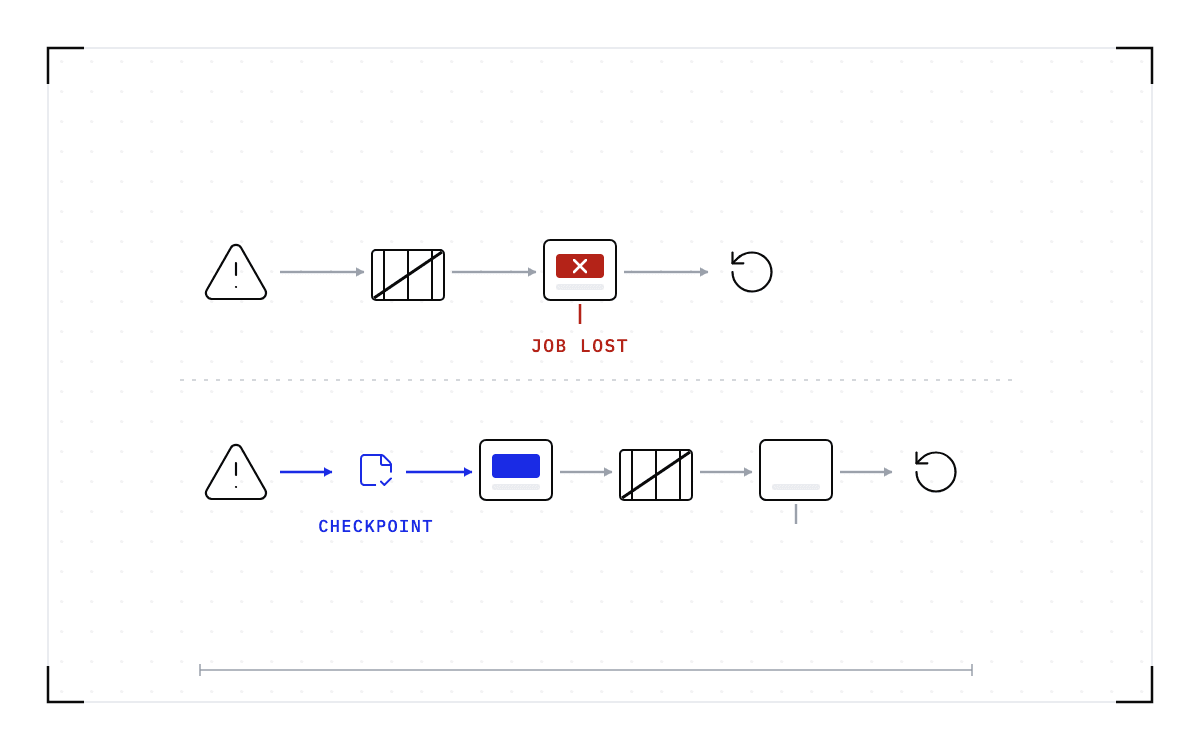
- If nothing saved the job's state before the fault, the work is gone. No reset, reboot or replacement part brings it back. The fleet health tools that detect and repair the node restart the job from whatever the application last wrote to disk.
- Saving the job's state below the application while it runs changes what the next fault costs. It costs a restore plus the work since the last checkpoint, instead of everything the job had done. The hardware still needs its reset.
- In this piece we walk through what the three error messages mean, why the fix ends in a reset or a reboot, and the hang that shows no error at all. Then we cover how often this happens on a real fleet, what the fleet health tools do today, and what changes when a checkpoint is taken while the job runs.
What does an Xid error or an uncorrectable ECC error mean?
A job that had been running for hours is gone, and the last thing in the log is a hardware fault. You may have seen it as "GPU has fallen off the bus", as "uncorrectable ECC error encountered", or as an Xid number in the kernel log with the node refusing work until somebody reboots it. The three messages mean different things.
An Xid is a number the NVIDIA driver writes to the kernel log when the GPU reports something it could not handle. NVIDIA's documentation is careful about what the number tells you: "Xid messages are intended to be used as debugging guides", and a given Xid "can be indicative of a hardware problem, an NVIDIA software problem, or a user application problem".
An uncorrectable ECC error is more specific. ECC, error-correcting code, fixes single-bit errors in GPU memory as they happen. An uncorrectable error is memory corruption the hardware cannot fix, and NVIDIA's memory-error guidance explains how a contained uncorrectable error terminates the affected application.
"Fallen off the bus" is the bluntest of the three. The driver tried to reach the GPU over PCIe and got nothing back, so as far as the operating system is concerned the card is no longer there. People write it down the way the driver does: "GPU has fallen off the bus. Rebooting the system provides a temporary solution." Most of the public discussion of that message comes from people using home machines with power supply and cooling problems, which is a different problem from a fleet GPU failing under a job.
Why the fix ends in a GPU reset or a node reboot
A GPU in this state is not usable until the device is put back into a known state, and NVIDIA's Xid catalog says so for the codes that matter here: "A GPU reset or node reboot is needed to clear this error." That applies to the errors the hardware cannot contain. For a contained uncorrectable ECC error on an Ampere or later data-center GPU, the same memory error management guide says the impact is limited "to the applications that encounter the error", other workloads "continue running unaffected", and those GPUs "do not require a GPU reset when memory errors occur", with rare uncontained cases as the exception.
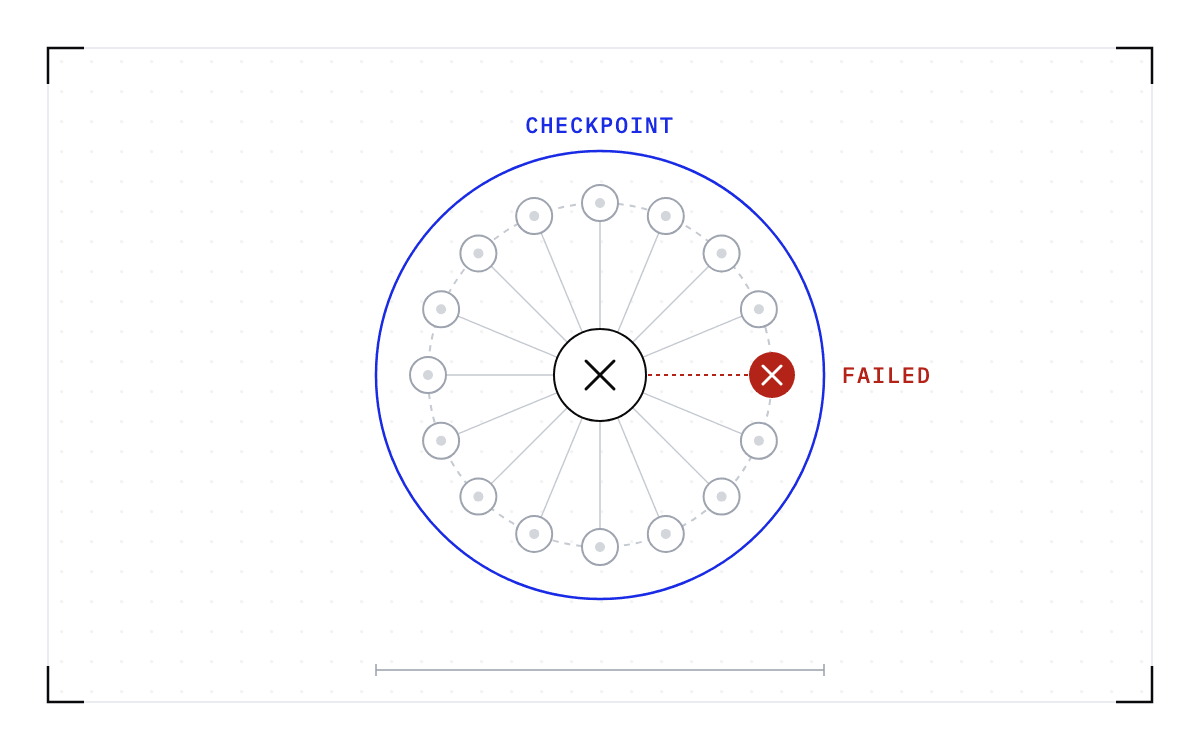
The reset is the smaller of the two actions, and even it comes too late for your job. The nvidia-smi manual requires applications using the device, including monitoring applications, to be stopped before a reset. Your job is one of the things holding a handle, so the reset runs only once the process using the GPU has exited. By the time the fix is available, the job is already over.
Some faults skip the reset entirely. An issue opened against NVIDIA's open GPU kernel modules in May 2026 states the worst case: "Recovery requires a full reboot (Node Reboot Required). No prior warnings."
Nothing in NVIDIA's Xid documentation concerns the job that was running. Its recommended actions all require someone to intervene after the fault.
When nothing crashes and only a reboot clears the fault
Not every fault announces itself. Reports describe a GPU that hangs with no error at all, the process unkillable and the fans at full speed. "Sending it SIGINT, SIGTERM or SIGKILL has no effect", says one. A quieter version shows up on long-lived nodes, where a job that never crashes gets slower over days and "a single reboot snaps performance back to normal, only for the slowdown to re-appear a week or two later".
The PyTorch forums have the same story from the training side. One thread has training that hangs and cannot be killed with kill -9, sometimes ending in a kernel panic. Another has training that runs for some epochs and then hangs with GPU use at zero. A third has a process that holds the full GPU memory but is not training. Across two dozen such reports, the recorded fixes are a driver or IOMMU workaround, killing a background process such as Xorg that holds the device, or a reboot, and most threads close with no confirmed fix.
There is no way to get the work out of a hung process. The checkpoint that helps is the one taken before the hang, which is what Cedana's heartbeat checkpointing is for, and the hung GPU still gets its reset. Once the reset is done, the job restores from that checkpoint instead of starting over.
Can one GPU be reset without draining the node?
Only if nothing else holds it. A reset fails "if any application, kernel module, or monitoring service still holds a handle on the device", and on a node where the other GPUs are busy the operator often cannot reset the one that locked up. One thread on NVIDIA's forum puts it plainly: "since the X Session is running fine on the other GPU it won't reset the selected frozen GPU so I'm forced to reboot". One report found the process holding the handle, killed it, and the reset then worked.
On Kubernetes the device plugin marks the whole GPU unhealthy, which "removes GPU capacity from Kubernetes even though the device may still be usable by other workloads", and a request to change that is open.
With the other jobs on the node checkpointed, you can move them off, reset the one GPU or reboot the node, and bring them back, instead of losing every job on the node to one card.
How often does this happen on a real fleet?
Once, this is a bad day. At fleet scale it is a rate you can plan around.
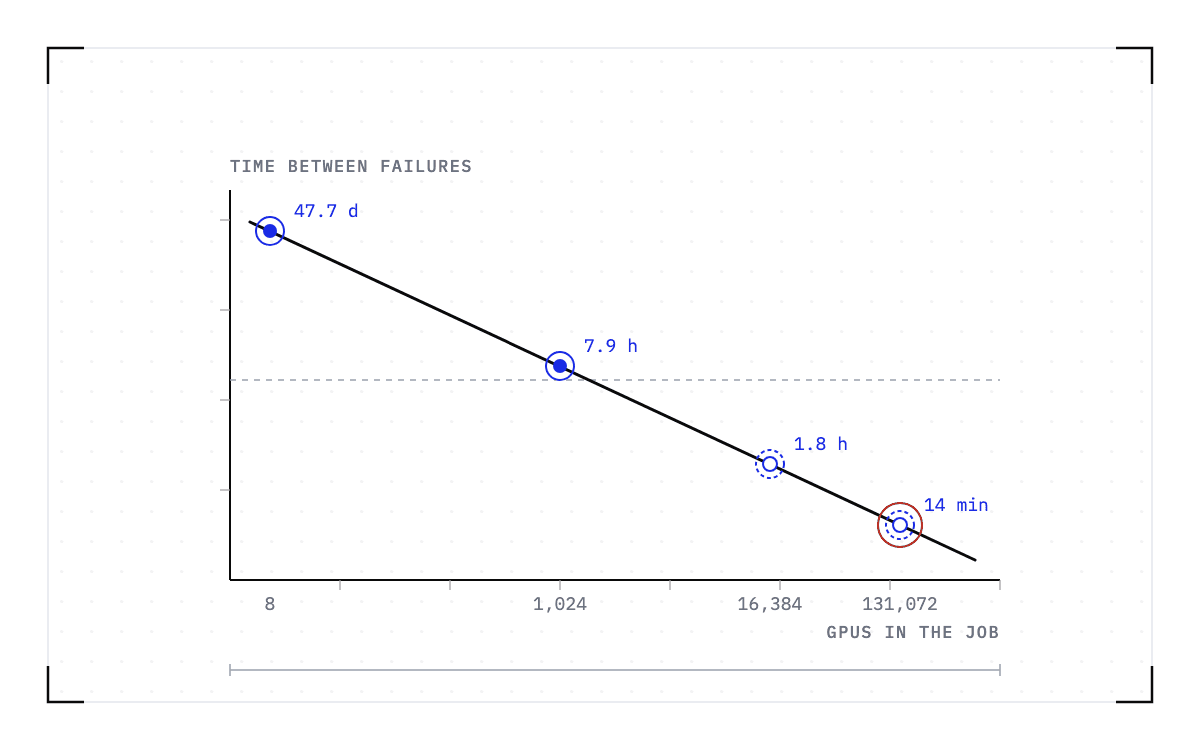
Meta published 11 months of data from two of its own GPU research clusters, in "Revisiting Reliability in Large-Scale Machine Learning Research Clusters" at HPCA 2025, covering 4 million jobs and over 150 million A100 GPU-hours. On those clusters a job spanning 1,024 GPUs ran a mean of 7.9 hours between failures. An 8-GPU job on the same hardware ran 47.7 days, two orders of magnitude longer. A failure in that study is any event that interrupts a job, so the 7.9-hour figure is not a hardware failure rate.
The gap is arithmetic, not a difference in hardware quality. A job stops when any node it depends on fails, so a job spread across N comparable nodes fails about N times as often as a job on one of them, if the nodes fail independently of each other, which a real fleet only roughly does. Meta's measurements stop at about 4,000 GPUs, and the paper extends the curve from there to 1.8 hours between failures at 16,384 GPUs and 0.23 hours, about 14 minutes, at 131,072.
Four not-to-scale rows: the mean interval between failures falls from 47.7 days at 8 GPUs to 7.9 hours at 1,024, then to a projected 1.8 hours at 16,384 and 0.23 hours at 131,072.
The interval between failures by job size
The interval between failures falls from 47.7 days on an 8-GPU job to 7.9 hours on a 1,024-GPU job, with 1.8 hours at 16,384 GPUs and 0.23 hours at 131,072 projected by the paper.
Long jobs are exposed to failure for longer, and large jobs span more GPUs, so these jobs face more interruptions. Crusoe writes on its engineering blog that at that scale "failures are so frequent that manual investigation and correction is unsustainable". A December 2025 paper on the resilience of H100 and Ampere GPUs names the consequence for the job: "GPU errors on both A100 and H100 GPUs frequently result in job failures due to the lack of robust recovery mechanisms at the application level."
What the fleet health tools do about it today
The fleet health tools address the hardware side of the problem, and they do it well.
NVIDIA's NVSentinel "detects and remediates GPU faults on Kubernetes nodes". Its README's three verbs are detect, protect, and remediate. Protect means "cordon and drain the affected node before a fault spreads to other jobs". Remediate means "auto-repair with a targeted GPU reset or a full reboot, then bring the node back into service".
DCGM is where much of that signal comes from. Its background health checks are "non-invasive monitoring operations that occur while jobs are running", and its user guide says what a fatal reading means for the work. Those situations "usually indicate the need for job termination and GPU health analysis".
The neoclouds run the same loop with their own hardware behind it. Crusoe's AutoClusters "automatically detects and replaces failed GPU nodes in under 5 minutes", and the remediation starts as NVSentinel's does: "The failed node is cordoned immediately so it stops accepting new workloads. Running workloads get a configurable grace period to checkpoint and terminate cleanly (default 30 seconds)." CoreWeave describes the outcome: "If an isolated failure occurs, the entire job restarts from the latest checkpoint."
So the job gets a healthy node quickly, but the restart begins from whatever the application last wrote to disk. The words checkpoint, resume, and migrate do not appear on NVSentinel's pages at all.
What the fleet health loop owns: detection, cordon and drain, a 30-second grace period and auto-repair, with the job restarting from the latest checkpoint left outside it.
What the fleet health loop owns
detects and remediates GPU faults on Kubernetes nodes
NVSentinelcordon and drain the affected node before a fault spreads to other jobs
NVSentinela configurable grace period to checkpoint and terminate cleanly, default 30 seconds
Crusoeauto-repair with a targeted GPU reset or a full reboot, then bring the node back into service
NVSentinel
Outside it, if an isolated failure occurs, the entire job restarts from the latest checkpoint.
CoreWeaveWhat changes when a checkpoint is taken while the job runs
Almost everything a GPU job is doing sits in GPU memory: the weights, the key-value (KV) cache, and the computation in progress. Nothing above the GPU keeps a copy of any of it, which is why a hardware fault destroys the work rather than interrupting it. The application's own checkpoint is the one exception, and it holds what the training script chose to write, at the interval someone chose to write it.
Saving the running state below the application, which is what we do at Cedana, turns the restart into a restore. Four things have to happen.
- The system checkpoints the workload at an interval while it runs and captures its full state. We call this heartbeat checkpointing, and it runs on an interval you set.
- The control plane detects the failure. Its background worker monitors jobs and runs checkpoint and restore actions when the policy calls for them, without an admin present.
- The control plane restores the last checkpoint on a healthy node, under Kubernetes or Slurm.
- The job resumes with no change to the application. It does not know it moved.
Cedana preserves the entire workload state (CUDA context, KV cache, file system, network, scheduler), so workloads automatically resume on a new instance as of the last checkpoint. The checkpoint interval sets the limit on lost work: what was done since the last checkpoint has to be done again, and you choose that interval as a policy setting. A hardware fault leaves no time to write a new checkpoint, so the resume starts from the last one the heartbeat took.
Our published benchmark measures the restore itself, on inference workers. Every run used one node with 8x NVIDIA B200 GPUs and 1.7 TB of system memory, on CUDA 12.9. Each model was served by SGLang from its official recipe, and the checkpoints were read from tmpfs, which lives in the node's own memory.
| Model | Parameters | Checkpoint | Native start | Restore |
|---|---|---|---|---|
| MiniMax-M2.7 | 229B | 244 GiB | 564 s | 57 s |
| GLM-5.2-FP8 | 753B | 734 GiB | 1,322 s | 61 s |
| Kimi-K2.6 | 1100B | 670 GiB | 1,217 s | 63 s |
| DeepSeek-V4-Pro | 1,600B | 873 GiB | 2,051 s | 70 s |
Restore time follows the size of the checkpoint, meaning how many bytes have to move, not the parameter count. The smallest checkpoint, 244 GiB, came back in 57 seconds and the largest, 873 GiB, in 70 seconds, while the parameter count grew sevenfold. On this node the restore column barely moves, and four rows cannot show more than that. A failure costs the resume time, not the state.
The job comes back on a compatible node, not the node whose GPU just failed. A checkpoint records the GPU, driver, engine and model versions it was taken against. If any of them changes, the checkpoint is invalid and the workload cold-starts instead.
The number of nodes a job spans is the other condition. The single-GPU and multi-GPU-on-a-single-node tiers ship in production today. Multi-node, where a single workload spans hundreds or thousands of GPUs across many nodes, is in design partnership with leading enterprises and neoclouds.
None of this makes the hardware more reliable. The GPU still falls off the bus and the node still needs its reset or its reboot. What changes is where the job is while that happens. Cedana is automated GPU checkpointing and migration infrastructure that increases the useful work your GPUs deliver. We save the job's state while it runs and bring it back on a healthy node when the control plane sees the fault. The next Xid then costs you a restore and the interval since the last checkpoint, instead of everything the job had done.
Related:
- One node failed and the whole training job died
- What torchrun, torchft and Ray Train restart from when a node dies
- What to do when vLLM or SGLang stops responding and nothing crashed
- GPU failure frequency scales with the fleet, not the on-call rotation
- What to do when DCGM flags a GPU that has a job running on it
Common questions
What happens to a training job when a GPU fails?
If nothing saved the job's state before the fault, that work is gone, and no GPU reset, node reboot or replacement part brings it back. Saving the state while the job runs changes what the next fault costs, even though the hardware still needs its reset or reboot.
Why does a GPU hang with the fans at full speed and no error at all?
Reports describe exactly this: a GPU that hangs with no error message, the process unkillable, and the fans at full speed, with sending it SIGINT, SIGTERM or SIGKILL having no effect. Most of these threads end with no confirmed fix, and where there is one, it is a reboot.
Can I reset just the one GPU that locked up, or do I have to drain the whole node?
Usually you have to drain the whole node. A single GPU on a node can lock up so that the reset will not run because something else on that node still holds the device, and on Kubernetes the same fault takes healthy capacity with it, marking the entire GPU unhealthy even though the device may still be usable by other workloads.
Why does my job quietly get slower over days instead of crashing outright?
That is a quieter version of the same kind of fault. A job that never crashes gets slower over days, and a single reboot snaps performance back to normal, only for the slowdown to reappear a week or two later.