TL;DR
- A run that needs a week does not fit inside a 24-hour allocation. When the Slurm time limit expires the job is killed and the next attempt starts the batch script over.
- GROMACS handles that itself:
-maxhstops the run just short of the limit and writes a checkpoint, and-cpicontinues from that file in the next allocation. - Application-level checkpointing works that well only where somebody built it, and it took GROMACS decades of engineering to get there. So the program running beside it on the same cluster has nothing to fall back on.
- A checkpoint taken below the program covers any program, because then nothing above it needs a checkpoint path of its own.
- In this piece we walk through what Slurm does at the time limit, what a GROMACS checkpoint holds, and what
-maxhand-cpido. Then we cover how a week-long run is chained across allocations, and why none of that machinery carries to the next application.
Slurm ends the job at the limit, and a requeue starts the script over
Every job on a Slurm cluster runs against a declared time limit, and when the enforced limit expires, Slurm terminates the job and records it as a TIMEOUT, which is the state you see in sacct. That ceiling is what lets the scheduler plan the queue. Backfill scheduling needs reasonably accurate time limits, because a pending job's expected start depends on when running jobs are expected to finish, which is why Slurm's scheduling configuration guide asks for them.
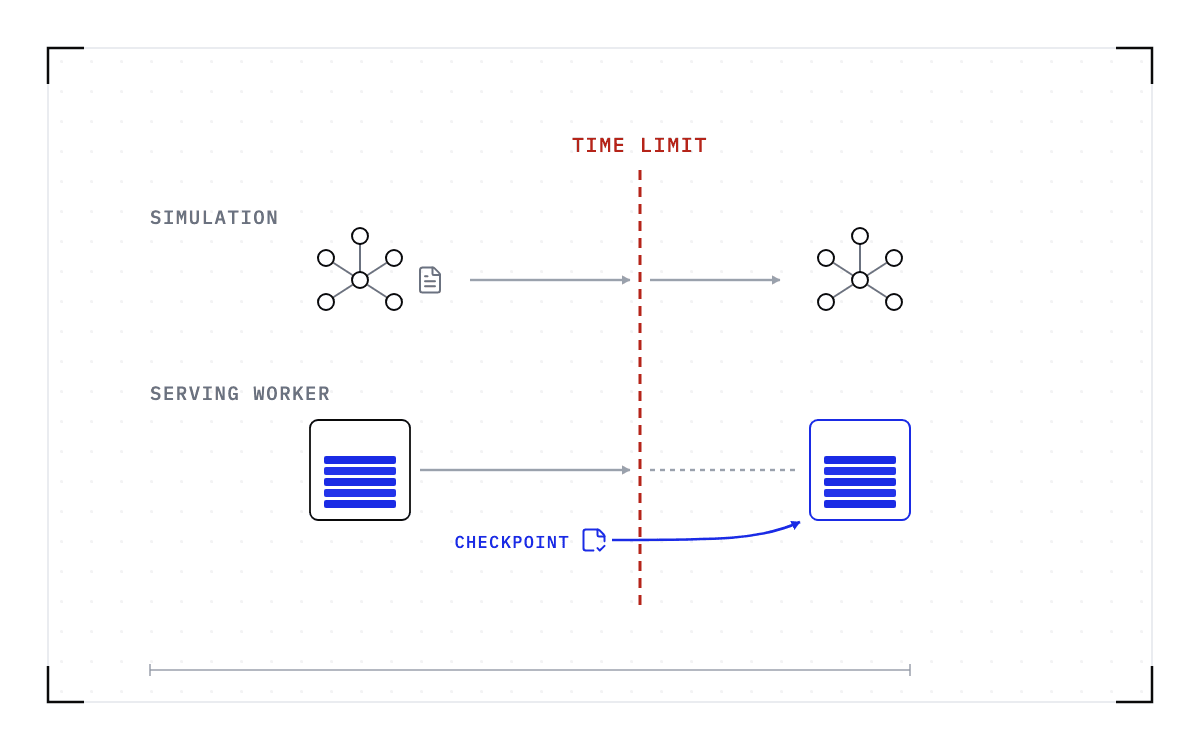
Before that limit, an administrator can requeue a job by hand, and Slurm's sbatch documentation lists node failure and preemption by a higher-priority job as the other triggers. In each case, the batch script starts from the beginning. Nothing in the scheduler holds on to the running process, so unless the program finds and loads a checkpoint of its own, the second run repeats the first one. The hardware spends those hours again and ends up where the first run had already been.
GROMACS saves exactly what the simulation needs to continue
GROMACS, a mature molecular dynamics engine, states the problem in its guide to managing long simulations: molecular simulations often run for longer than a single command-line process lives, so the program needed a way to stop and restart that is equivalent to a single run.
When gmx mdrun is halted, it writes a checkpoint holding a full-precision copy of the positions and velocities along with the state information the algorithms need in order to restart. A run brought back from that file behaves as though the interruption never happened.
After an unplanned stop, mdrun truncates the output files back to the time of the last checkpoint it wrote and continues from there, as though the simulation had stopped normally at that point. Knowing which state matters and writing it safely took decades of engineering, and that engineering is what lets you interrupt a simulation without losing it.
Four things make that path work at the command line: a flag that watches the clock, a flag that sets the interval, the file the checkpoints go to, and the flag that reads them back.
| Flag or file | What it does |
|---|---|
-maxh | Stops the run and writes a checkpoint shortly before the wall time you give it |
-cpt | Sets the interval in minutes at which checkpoints of the complete state are written, 15 by default |
state.cpt | The file those checkpoints are written to, and the file a restart reads |
-cpi | Continues a simulation by reading the full state back from the checkpoint file |
-maxh is the part built for the scheduler
Everything above would serve you just as well if you wanted to stop a run by hand. -maxh is the piece that ties the run to a scheduler's clock, and the mdrun documentation states the mechanic exactly: "With option -maxh a simulation is terminated and a checkpoint file is written at the first neighbor search step where the run time exceeds -maxh*0.99 hours." So the run stops itself once 99% of the hours you named have elapsed, just short of the wall time.
A dial filled to 99 percent: -maxh ends the run once 99 percent of the hours you named have elapsed.
Where -maxh stops the run
The flag also moves the decision about when the run ends from the scheduler to the program. Without it, the scheduler makes that call and the program finds out by being killed. With it, the program watches the same deadline and ends the run itself, leaving a usable file on disk.
The manual's cluster-queue example is gmx mdrun -maxh 2.5, which terminates the simulation shortly before 2.5 hours elapse. The flag helps a run cooperate with a job scheduler, though the user guide marks one edge: it can be problematic where jobs can be suspended.
Crossing from one allocation to the next is something the user sets up
The two flags only carry a run across allocations if you wire them together in the batch script yourself.
- Size
-maxhto the allocation, in the batch script that launchesgmx mdrun. - mdrun ends the run and writes its checkpoint just short of the limit.
- The resubmitted or requeued script starts mdrun again with
-cpi, pointed at the checkpoint file.
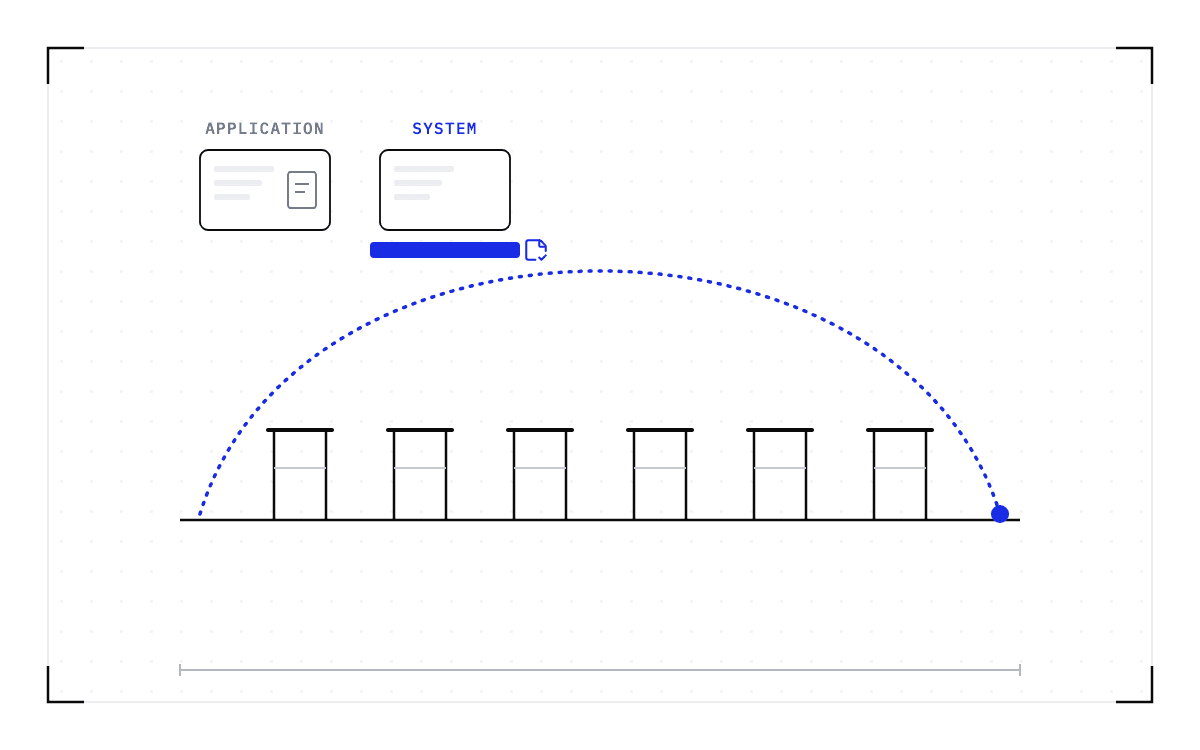
On a partition with a 24-hour limit, a simulation that needs a week runs as a chain of allocations. Each allocation ends with a checkpoint, and the run continues from it in the next allocation. The limit stays exactly where the administrator set it, and the work still finishes.
A week-long run as a chain of 24-hour allocations, joined by one run line, with a checkpoint written at each boundary and read back with -cpi in the next allocation.
A week-long run across 24-hour allocations
A week-long simulation drawn as a chain of 24-hour allocations, each ending in a checkpoint the next allocation reads back.
You pay for that chain by having to know the flag exists and size it to the allocation. That length is a property of the partition rather than of the program, so it changes when you move to another cluster or another queue. A requeued script runs from its first line, so it has to direct the restarted run to the checkpoint file or the simulation starts over. GROMACS built the machinery, but invoking it every time belongs to the person running the job.
None of that machinery transfers to the next program on the cluster
A program that offers you this path has to know which state matters, serialize it correctly, write it safely, expose a reliable restart path, and give you a wall-time-aware switch you have to know to set. Every program answers those questions differently.
The authors of CRAFT, a library built to make application-level checkpoint and restart (CR) easier, put both halves of that in one sentence: "Application-level CR is the most effective CR technique in terms of overhead efficiency but it takes a lot of implementation effort." The efficiency is the one you see in GROMACS. Someone works out by hand which data has to be saved, so the checkpoint holds the minimum the run needs and costs the least to take.
The price of that efficiency is that the work of deciding is done once per program. A research computing center supporting dozens of applications makes that decision dozens of times, and the next application to arrive starts from nothing. When no maintained checkpoint path exists, you have four options:
- Break the workload into stages that each fit inside an allocation.
- Configure or build a checkpoint-and-restart path for the application.
- Request access to a long-running partition granted as an exception.
- Restart the job from the beginning after a TIMEOUT.
One of the most mature programs in high-performance computing needed a flag to survive a scheduler policy
What GROMACS built is the measure of what every other application on the cluster is being asked to build for itself. It is the counterexample that works, and it works because a project with decades of engineering in it built the whole path, down to the flag you have to remember. The programs beside it on the same cluster face the same limit without that engineering behind them.
The way out of paying for that path once per application is to take the checkpoint underneath it. A layer below the program can save the running job and bring it back afterwards, so nothing above has to carry a checkpoint path of its own. Cedana is automated GPU checkpointing and migration infrastructure that increases the useful work your GPUs deliver. On Slurm, that means Cedana's Slurm integration checkpoints the job as the time limit approaches, releases the allocation, requeues the job, and restores it on a compatible node once Slurm grants the next allocation. Nothing in your program has to change, and you do not have to remember a flag.
Related:
- Your Slurm job was cancelled due to time limit. What to do now
- Slurm has no suspend option for GPU jobs. What preemption without killing the job looks like
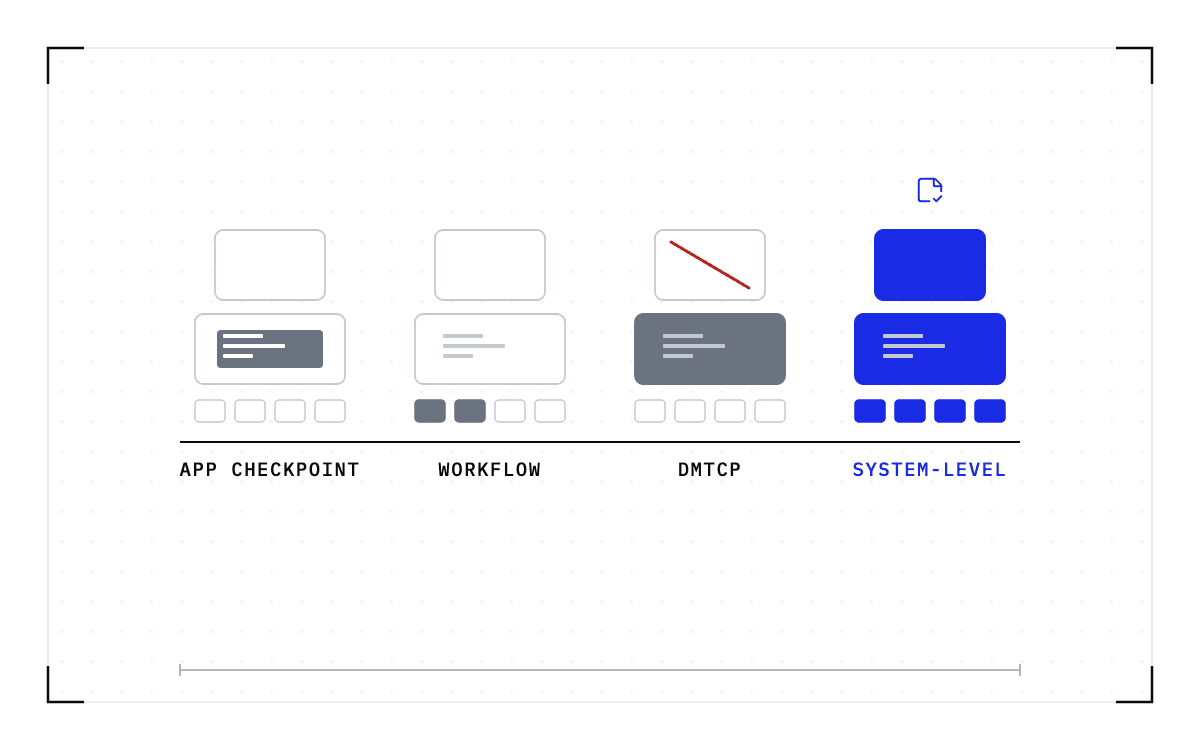
- DMTCP, application checkpoints, workflow managers and system-level checkpointing: what each covers on a Slurm cluster
- Stateful AI has the same boundary problem as long HPC runs
- System-level vs application-level GPU checkpointing: the category and the bar
Common questions
How do I make GROMACS stop before the wall-time limit and save its state?
Run gmx mdrun with -maxh set to the length of your allocation. The run stops itself once 99% of that time has elapsed and writes its checkpoint file, state.cpt, on the way out. For a program with no flag like that, Cedana's Slurm integration takes the checkpoint below the application as the time limit approaches, requeues the job, and restores it on a compatible node in the next allocation.
When Slurm requeues my job after it times out, does it resume where it left off or restart the whole script?
It restarts the whole script. The batch script starts from the beginning, and nothing in the scheduler holds on to the running process, so unless the program finds and loads a checkpoint of its own, the second run repeats the first one. The hardware spends those hours again and ends up where the first run had already been.
How do I continue a GROMACS run in the next allocation?
Start gmx mdrun again with -cpi pointed at the checkpoint file. It reads the full state back and continues as if the run had not stopped. On a partition with a 24-hour limit a simulation that needs a week runs as a chain of allocations. Each allocation ends with a checkpoint, and the run continues from it in the next allocation, with the limit staying exactly where the administrator set it.
Why did my job get killed, and what does the TIMEOUT state mean?
Every job on a Slurm cluster runs against a declared time limit, and when the enforced limit expires, Slurm terminates the job and records it as a TIMEOUT. That ceiling helps the scheduler manage the queue, since backfill scheduling needs reasonably accurate time limits to know when running jobs are expected to finish.