TL;DR
- Your run ended with CANCELLED AT ... DUE TO TIME LIMIT, which means Slurm stopped it because the clock on its allocation ran out. Anything held only in memory since the last save is gone; what the job wrote to disk is still there.
- Centers almost never extend a running job. What people do instead is chain jobs, have the job save itself before the kill, use DMTCP, or use a workflow manager. Each of those assumes the program can save its own state or leaves the running step to start over.
- A Slurm requeue brings back the batch script, not the running process, so on its own it restarts from line one. For the next run, Cedana's Slurm integration checkpoints the running job as the limit approaches, releases the allocation, and restores it on a compatible node in the next allocation. It picks up where it left off, and the same checkpoint covers preemption.
- In this piece we walk through whether the work is gone, why the limit exists, and how to ask for more time and what it costs. Then we cover how people finish jobs longer than the limit today, why a requeue starts from the beginning, and how to make the next run save its state.
Is the work I already did gone?
If nothing saved the job's state, yes. The running process ends with the job, and none of what it held in memory can be recovered from the scheduler afterwards. What the job had already written to disk is untouched, so its output files, its logs, and any checkpoint the program wrote for itself are all still there.
Saving the complete state of a running job so it can be brought back later is called checkpointing. Slurm does not write a checkpoint for you, and it cannot tell a job that resumed from a checkpoint apart from a job that started fresh. What the scheduler does keep is the accounting row: sacct will show you the job's state, its elapsed time, and the time limit it was given, which is how you confirm the clock ended the run rather than something else.
Two things are worth checking before you accept that the work is gone. If the program writes its own checkpoint, restart from it: a GROMACS run does, and giving gmx mdrun the -cpi option reads the full state back and continues from where the checkpoint was written. If you launched the job under DMTCP, the checkpoint files it left behind can be restarted the same way. If neither applies, the next run needs a way to save its state so a requeue can continue the work instead of starting it again.
Why was my job cancelled at its time limit?
Every job on a shared high-performance computing cluster declares how long it may run, and Slurm holds it to that. Centers call the declared time the time limit, the walltime, or the wall-time limit. When it runs out, Slurm terminates the job and records the state as TIMEOUT, and whatever the run held in memory ends with it, whether the job had just started or was nearly finished.
The limit is there because the queue is planned around it. Backfill is when the scheduler starts a lower-priority job early, in a gap, as long as doing so will not delay a higher-priority reservation, and the scheduler can make that call only if it knows when the running work is expected to finish. That is why Slurm's scheduling configuration guide asks for reasonably accurate time limits.
Other things at the center depend on it too. An allocation returns its nodes to the pool only when it ends, so no amount of fairness in the queue makes the hardware come back sooner. Draining a set of nodes for maintenance is clean only once the last job on them has finished, so a bounded runtime is what lets a center announce a maintenance window and hold to it. And the limit is the last safeguard against a hung process or an infinite loop, either of which would otherwise hold an allocation indefinitely.
Can I get more time?
At most centers, no. TACC's FAQ explains why: "No. Slurm does not allow TACC staff to add resources, such as time, to a running job." Minnesota gives the same answer for its clusters: "Walltime increases are generally not allowed."
How do I get access to a queue with a longer wall-time limit?
Some centers allow exceptions, and an administrator has to approve them. The University of Utah's Center for High Performance Computing publishes its cluster policies, and one line reads "Special access is given to a long qos to exceed the MAX walltime limit on a case-by-case basis." A QOS, or quality of service, is the Slurm policy object that carries limits such as maximum wall time. On Utah's general nodes a job is capped at 72 hours, and the long QOS raises that ceiling to 14 days.
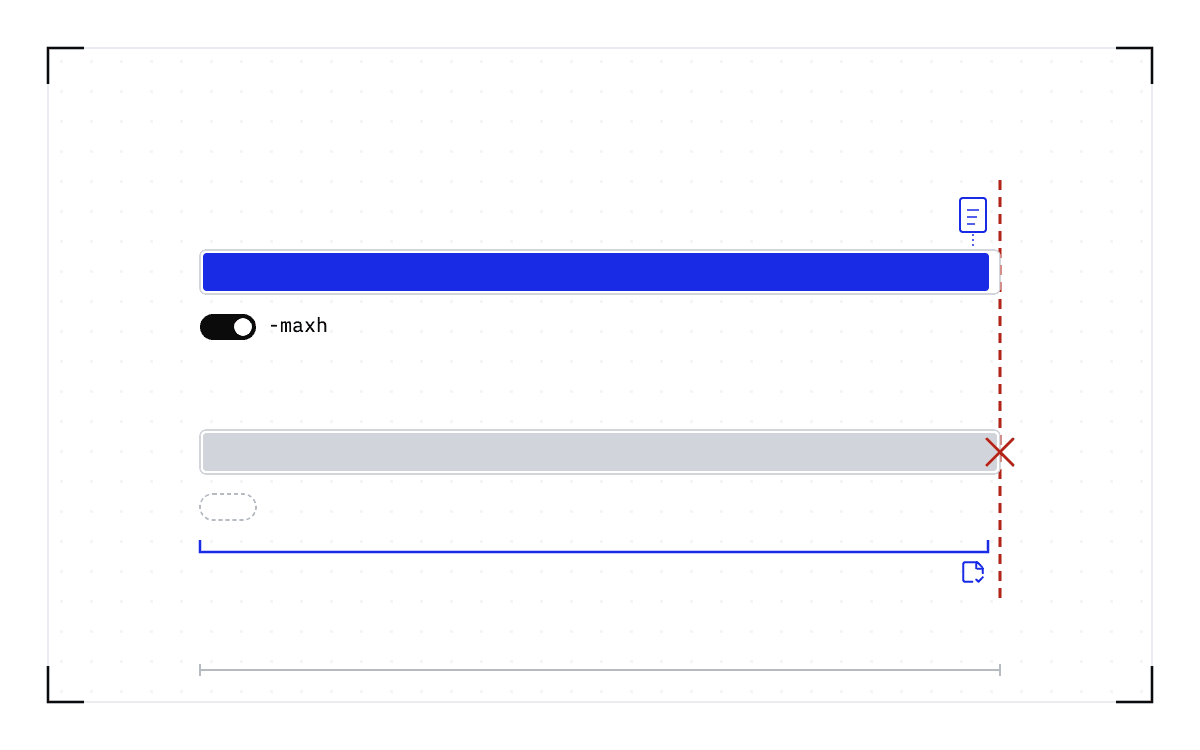
Fourteen day cells: the 72-hour cap on Utah's general nodes is the first three of the 14 days the long QOS allows, granted on a case-by-case basis.
The long QOS ceiling at Utah
on a case-by-case basis
Fourteen day cells in one row: the 72-hour cap on Utah's general nodes is the first three of them, and all fourteen together are the 14 days the long QOS raises that ceiling to.
The Ohio Supercomputer Center grants the same kind of exception on request and with a justification, and publishes its extension policy in writing. GWDG, the Göttingen computing center, asks for a support request naming the job id and the reason. Whichever center you are on, the decision belongs to an administrator.
Asking for more time on the next submission is a different question, and it costs something of its own. The University of Maryland's high-performance computing group warns its users that requesting excessive wall time may keep a job from being backfilled at all, which delays the start.
What about a hosted notebook with its own time limit?
Hosted notebooks have the same kind of cap and no administrator to ask. On r/learnmachinelearning one user writes that the instance "has a time limit of 12 hours", and another that Google Colab Pro "doesn't let you use the service for more than 24 hours in one go" while the experiments "might run for approximately 4 days". The answers there recommend the platform's own options: save checkpoints to storage before the cutoff and restart later, or move to a cloud machine you control. Nothing below applies to a hosted notebook, because a checkpoint taken below the application needs a machine you can install on.
How do people finish jobs that need longer than the limit?
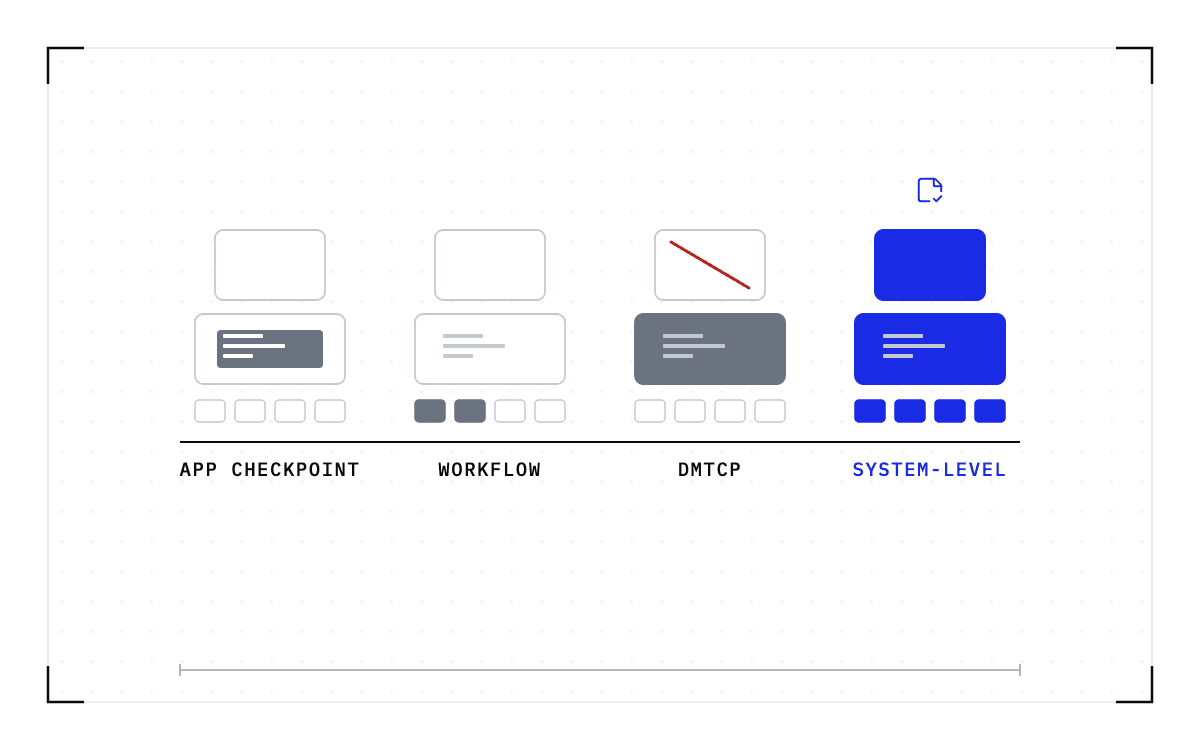
University guides describe four approaches: chaining jobs, having the job save itself, DMTCP, and a workflow manager. The first two assume the program inside the job can save its own state and pick it up again, which is the thing to check before you invest in them. DMTCP takes the checkpoint from outside the program instead, and a workflow manager saves nothing about a running step and reuses the pipeline steps that already finished.
The four approaches sorted by what each one assumes: chaining jobs and having the job save itself assume the program can save its own state, the thing to check before you invest, while DMTCP takes the checkpoint from outside the program and a workflow manager saves nothing about a running step.
The four approaches
Chaining jobs and having the job save itself assume the program can save its own state, the thing to check before you invest; DMTCP takes the checkpoint from outside the program; a workflow manager saves nothing about a running step.
The first is to split the run into pieces that each fit inside the limit, then submit them in a chain. Slurm calls this job dependencies, and sbatch --dependency holds each piece until the one before it has finished. Princeton, TACC, and Northeastern document the pattern, and a job array is the other shape it takes. Piece two has to start where piece one stopped, and arranging that is the program's job rather than the scheduler's.
The second is to have the job save itself before the kill arrives. --signal=B:USR1@60 asks Slurm to send USR1 to the batch script 60 seconds before the limit. The script traps that signal, tells the program to write a checkpoint, and then calls scontrol requeue on its own job id. Submit with --requeue so the job is allowed back, use --open-mode=append so the next attempt does not overwrite the log, and read SLURM_RESTART_COUNT to tell a restart from a first run. NERSC, Yale, Michigan, and Utah all publish a version of this. Yale's page adds a distinction that catches people out: Slurm requeues a preempted job automatically, but it "will NOT automatically requeue a timed out job", so the timeout case is the one you have to handle in the script yourself.
The third is DMTCP, short for Distributed MultiThreaded CheckPointing, which checkpoints a program from the outside and so covers programs with no checkpoint code of their own. NERSC documents how to run DMTCP on Slurm, and its examples are CPU-only. Its scope is narrower than it sounds. MPI programs need the MANA plugin on top, and Georgia State's page describes GPU support plainly: "Cuda applications are not supported right now with DMTCP. So, PyTorch, TensorFlow, keras that use GPU cannot be checkpointed with dmtcp". An administrator on r/HPC, reporting a decade of trying, says that for single-node jobs it "seems to work OK. MPI jobs? Forget about it."
The fourth is a workflow manager, and it is the top-voted answer on the r/bioinformatics thread about checkpointing on Slurm. Nextflow with -resume, or Snakemake, records which steps of a pipeline finished and starts the next run at the step that was interrupted. What it does not save is the state of the running step, so a mapping step that had been running for hours starts again from its own beginning.
Reusing the steps that already finished is a different thing from saving an interrupted application. Cedana takes the checkpoint from outside the program the way DMTCP does, and covers the CUDA applications DMTCP excludes, for a job on a single node.
What if the job is a workflow that cannot see the clock?
Two askers on r/HPC hit the limit from inside a workflow. One ran a long-lived worker that pulled tasks from a queue and found it "not smart enough to know that if there is only 1 hour left before the worker process needs to terminate and restart that it shouldn't start a 4 hour process". The answer was to give up the worker and submit one Slurm job per task, chained with dependencies. The other ran CryoSPARC, whose master process "will hit its walltime limit, and any jobs started by it won't be able to communicate with it and terminate themselves". That thread has no answer.
Both are the same problem seen from inside a workflow. The limit ends a process that holds state, here the worker or the master, and the workflow has no copy of it. A checkpoint taken below the workflow saves that process with everything it holds, so a requeue continues it instead of starting it over.
Why does a Slurm requeue start from the beginning?
What comes back is the batch script, not the running process. Slurm's sbatch documentation says it in one sentence: "When a job is requeued, the batch script is initiated from its beginning." The job returns with the same script and the same resource request, and neither the memory it held nor the point it had reached returns with them.
The clock is not the only thing that sends a job back to the queue. The same page names an administrator requeuing the job by hand, a node failure, and preemption by a higher-priority job, and each leaves the script running again from its first line. The retry re-runs rather than resumes.
How do I make my job save its state so a requeue continues it instead of starting over?
Something has to save the state before the job stops and put it back afterwards, and when the program cannot do that itself, the save has to happen below it. Taking the checkpoint below the application means capturing the running process from the outside, so the program needs no checkpoint code of its own.
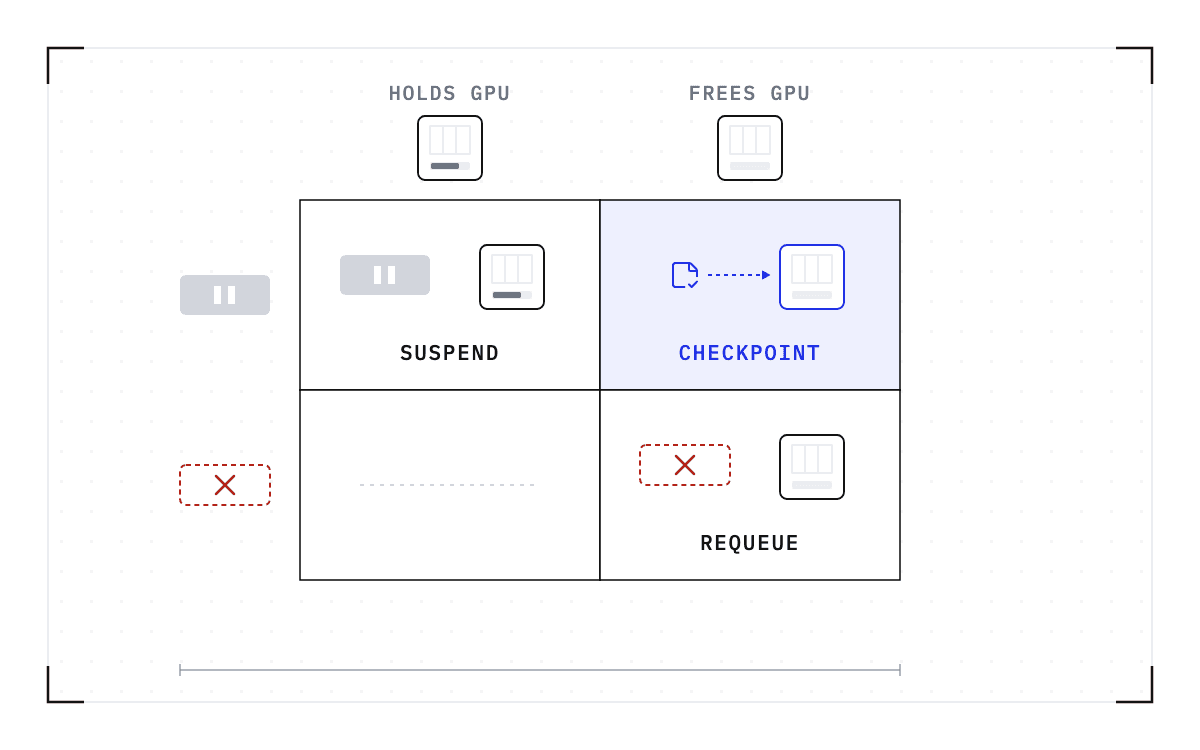
That is what Cedana's Slurm integration does. As the declared limit approaches, it takes a checkpoint of the running process and releases the allocation, so the nodes go back to the pool. The job follows Slurm's normal requeue path, and it is then restored on a compatible node and continues the execution that was already underway, with no application code changes and no checkpoint path written for that program. Cedana also checkpoints on an interval you set while the job runs, which we call heartbeat checkpointing.
The restore cannot go to whichever node the queue offers next. A checkpoint records the GPU, driver, engine and model versions it was taken against. If any of them changes, the checkpoint is invalid and the workload cold-starts instead. Some kinds of state cannot be captured at all. What cannot be checkpointed in a GPU workload? sets out those limits.
The same automation covers preemption, which is one of the events that requeues a job in the first place. With the integration in place, a job is checkpointed automatically when it is preempted and resumed once it starts running again after Slurm requeues it, provided Slurm is configured to requeue the job. The high-priority job takes the node on whatever schedule the policy already sets.
So on a cluster with a 24-hour limit, a week-long simulation still completes, because each allocation ends with a checkpoint that the job restores in the next allocation, and the limit stays where the administrator set it. Cedana has published an account of the same mechanism running scientific workloads: GROMACS and Boltz-2 running in tandem at Caltech in a preemption pipeline built on Kubernetes with Kueue. That uses a different scheduler and a different trigger, but the checkpoint and restore mechanism underneath is the one described here. Cedana is automated GPU checkpointing and migration infrastructure that increases the useful work your GPUs deliver. On Slurm, that means a job reaching its limit is saved and requeued instead of killed, and the next allocation continues the work rather than repeating it.
Related:
- Slurm has no suspend option for GPU jobs. What preemption without killing the job looks like
- DMTCP, application checkpoints, workflow managers and system-level checkpointing: what each covers on a Slurm cluster
- GROMACS shows both the value and the limit of application checkpointing
- Stateful AI has the same boundary problem as long HPC runs
- Measuring the cost of wall-time termination from your sacct data
- A 90-day wall-time PoC: what to measure before you change policy
- What cannot be checkpointed in a GPU workload?
Common questions
How do I make my job save its state so it can pick up where it left off instead of starting over?
Something has to save the state before the job stops and put it back afterwards, and when the program cannot do that itself, the save has to happen below it. As the declared limit approaches, Cedana's Slurm integration takes a checkpoint of the running process and releases the allocation, so the nodes go back to the pool, and the job is restored on a compatible node and continues the execution that was already underway.
When Slurm requeues my job after it's preempted or times out, does it resume where it left off, or restart the whole script?
A requeue brings back the batch script, not the running process, so the job restarts from its first line, and neither the memory it held nor the point it had reached returns with it. Slurm requeues a preempted job automatically, but it will not automatically requeue a timed out job, so the timeout case needs a script that requests the requeue itself.
My computation needs more time than the fixed wall-time limit allows and I cannot get the limit raised. How do I split or chain it across multiple job submissions so the whole thing still finishes?
Slurm calls this pattern job dependencies: split the run into pieces that each fit inside the limit and use sbatch --dependency to hold each piece until the one before it has finished, a pattern Princeton, TACC, and Northeastern document. With Cedana's Slurm integration the same thing happens automatically: each allocation ends with a checkpoint that the job restores in the next allocation, so a week-long simulation still completes on a cluster with a 24-hour limit.
Why did my job get killed, and what does the TIMEOUT state mean?
Every job on a shared high-performance computing cluster declares how long it may run, and when that declared time runs out, Slurm terminates the job and records the state as TIMEOUT, whether the job had just started or was nearly finished. What counts as the maximum depends on the partition and QOS your job runs under.
Can you give my already-running job more time before it's killed, or grant me an extension?
At most centers, no. TACC's FAQ says Slurm does not allow staff to add resources such as time to a running job, and Minnesota gives the same answer for its clusters.
How do I get access to a queue that allows a longer maximum wall-time?
Some centers grant an exception through an administrator, such as Utah's long QOS, which raises its general 72-hour cap to 14 days on a case-by-case basis, or Ohio and GWDG's request-based extensions. The decision belongs to an administrator, and asking for more time on a future submission can also delay backfill for that job.