TL;DR
- When a node running a GPU job goes away and nothing underneath the job saved what it was doing, the job starts again from the beginning. Everything it had built up in memory is gone.
- Copying GPU memory on its own does not bring the workload back. A restore also needs the file system, the network, the container, what the scheduler knows about the job, and the coordination across the GPUs of one job.
- We capture all of that below the serving engine, at the operating-system and CUDA-driver levels, so nothing above that layer has to change. Cedana is automated GPU checkpointing and migration infrastructure that increases the useful work your GPUs deliver. On your cluster that means one daemon on every node, under SGLang, vLLM or TensorRT-LLM, on Slurm and on Kubernetes. A node that goes away no longer has to cost you the run.
- In this piece we walk through where the capture sits, what a restore needs, how we capture the GPU side and the CPU side, and what a multi-GPU job adds. Then we cover what a restore and a migration are, what the layer costs while your workload runs, how big a checkpoint is and where it goes, and what decides when a checkpoint is taken.
The capture sits below the serving engine, so one mechanism covers every workload
When a node running your GPU job goes away and nothing underneath the job saved what it was doing, you start the job again from the beginning, because there is nothing to go back to. At Cedana, we capture that live state below the serving engine, at the operating-system and CUDA-driver levels, with a daemon on every node: CRIU handles the CPU side, and our own driver-level interposition handles the GPU side.
The daemon runs at the operating-system kernel layer, between the kernel and the container runtime, and from there it captures GPU memory, CPU state, network state, file-system state, and scheduler state. The person who submitted the job does not have to know it is there.
A stack of four bands: the serving engine with SGLang, vLLM and TensorRT-LLM at the top, the container runtime with runc and containerd below it, then the tinted daemon band split into CRIU handling the CPU side and driver-level interposition handling the GPU side, and the operating-system and CUDA-driver levels at the bottom.
Where the daemon sits
The daemon band sits below the serving engine and the container runtime, and above the operating-system and CUDA-driver levels.
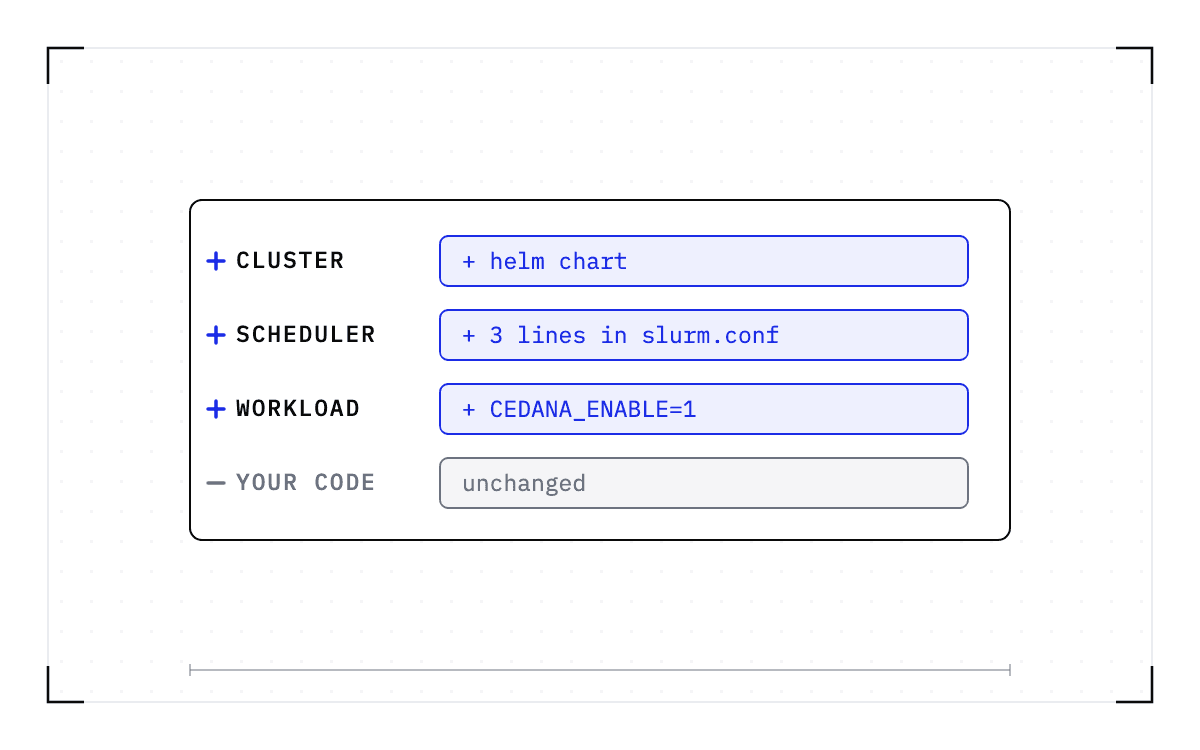
On Kubernetes, the operator adds one line to the pod spec, the Cedana runtime class, and a single Helm chart runs the daemon as a DaemonSet. On Slurm, a one-time installer registers it as the task plugin, with no custom Slurm build, and you keep using sbatch, srun, squeue, and scancel. Both runc and containerd are supported across the whole command set.
The capture happens below the engine, so the workload above that layer does not need to change. We capture your workload the same way under SGLang, vLLM, and TensorRT-LLM, and each checkpoint comes back on the engine and version it was taken with. The same daemon covers fine-tuning runs and HPC jobs, because neither the application nor the engine is asked to change.
A GPU capture on its own does not bring a workload back
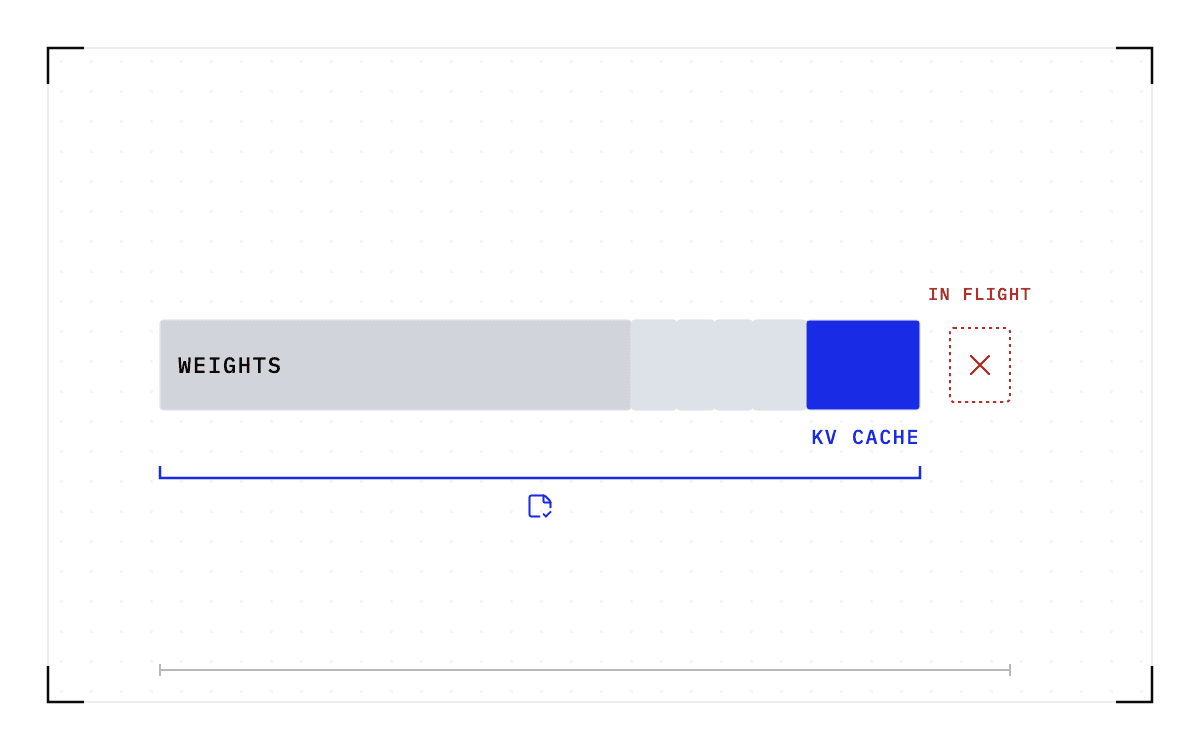
A restore needs the core GPU state, the state around it, and a control plane that decides when to act. Only the first two are saved inside the checkpoint.
| What a restore needs | What it is |
|---|---|
| The core GPU state | The CUDA context, the key-value (KV) cache, and the in-flight state. In practice, that is the weights in memory, the compiled CUDA graphs, the runtime state, and the cached state of every session that was being served |
| The state around it | File-system state, network state, container state, what the scheduler knows about the job, and coordination across the GPUs of one job on a node |
| A control plane, which is software rather than saved data | The policy that decides when to checkpoint, when to resume, and where a resumed workload goes |
The middle row is why copying device memory is not enough to resume a workload. Sockets are captured, so your connections survive a failure. Files come back as they were in the container's read and write layers, and process memory comes back with them, so the process continues rather than starting over.
We interpose at the driver API and hand the process to CRIU
On the GPU side, we interpose at the driver API while the process is running, and at that layer we track the state a restore needs: device memory, the CUDA context, the streams, and the compiled graphs.
On the CPU side, the daemon hands the process to CRIU, checkpoint and restore in userspace. The checkpoint request runs through a list of adapters inside the daemon before it reaches CRIU. CRIU covers the process, its memory, its files, and its sockets, but not what lives on the GPU, so the GPU needs a layer of its own. CRIU's documentation says why: "GPU state such as device memory, contexts, and queues that lives outside normal process address space needs special handling, so CRIU relies on vendor-specific plugins."
Capturing a multi-GPU job means stopping every GPU at the same boundary
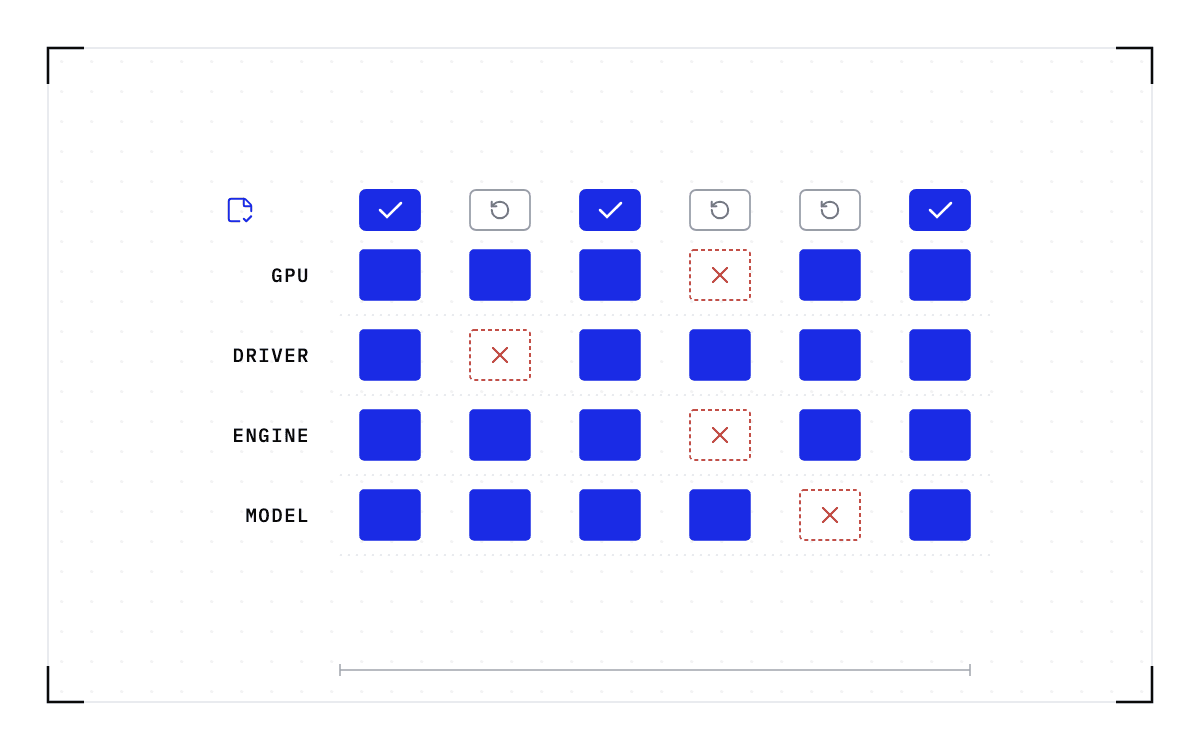
A modern inference or HPC workload spans 4, 8, or 16 GPUs on one node, and those GPUs coordinate through NVLink and frameworks such as NCCL (the NVIDIA Collective Communications Library) or MPI (the Message Passing Interface). So a clean capture means synchronizing every GPU at exactly the same boundary in the distributed computation, because what is saved on one GPU has to agree with what is saved on the next. For workloads that coordinate through NCCL, our documentation specifies an NCCL freeze type to use at dump time.
The same coordination is harder when the GPUs of one job sit in different machines, which is where the multi-node support boundary falls. The hard part is coordination, not capture. The single-GPU and multi-GPU-on-a-single-node tiers ship in production today. Multi-node, where a single workload spans hundreds or thousands of GPUs across many nodes, is in design partnership with leading enterprises and neoclouds. If your jobs span nodes and this is the case you need solved, talk to Cedana about a design partnership.
A restore continues the run, and a migration is the same restore somewhere else
A restore brings the checkpoint back and continues the workload from it, so the process resumes at the instruction it was on and its sessions are intact. A restart begins a new run instead. A migration is a restore on different hardware, so the checkpoint is the same and only the destination changes.
A restore and a migration are both bounded by one compatibility rule. A checkpoint records the GPU, driver, engine and model versions it was taken against. If any of them changes, the checkpoint is invalid and the workload cold-starts instead.
Our published benchmark measures what a restore saves you. Every run used one node running CUDA 12.9, with 8x NVIDIA B200 GPUs and 1.7 TB of system memory, and each model was served by SGLang from its official recipe. The native cold start was timed from engine launch to ready-to-serve, including weight loading and full engine initialization, and the restore was timed on the same fully initialized engine, from the start of the restore to ready-to-serve.
| Model | Parameters | Checkpoint | Native start | Cedana restore | Speedup |
|---|---|---|---|---|---|
| MiniMax-M2.7 | 229B | 244 GiB | 564 s | 57 s | 9.9x |
| GLM-5.2-FP8 | 753B | 734 GiB | 1,322 s | 61 s | 21.7x |
| Kimi-K2.6 | 1100B | 670 GiB | 1,217 s | 63 s | 19.3x |
| DeepSeek-V4-Pro | 1,600B | 873 GiB | 2,051 s | 70 s | 29.3x |
The parameter count grows sevenfold from the first row to the last, while the restore column barely moves. Restore time follows the size of the checkpoint, meaning how many bytes have to move, not the parameter count. Across these four rows the checkpoint grows 3.6 times and the restore time 1.2 times, and four rows on one node cannot show more than that on their own. A native start rebuilds all of that state, while a restore copies it back.
Leaving the capture running has two costs
The first cost is interception, and you pay it for as long as the workload runs. Interception happens on the CPU side, and most GPU workloads have the CPU waiting on the GPU, so on a job that issues few driver calls per unit of GPU work the cost fits inside that waiting time. Cedana's steady-state overhead is under 2%, often closer to zero. The measurements behind that figure are on our documentation site, taken on an H100 PCIe, an L4, and an A100, and they include a vLLM throughput run.
The second cost is the checkpoint itself, a brief pause while the state is captured. How often you pay it is a policy setting, and between checkpoints the workload runs as it did before.
How big is a checkpoint, and where does it get stored?
A checkpoint is mostly the memory the workload was using at the moment it was taken, with the process, file, and socket state around it. The four frontier models in the published set produced checkpoints of 244 to 873 GiB.
The checkpoint streams out of memory to NFS, S3, Google Cloud Storage, or Cedana's own storage, with no staging on the source, and any POSIX-compliant file system works. The checkpoint file's lifecycle is configurable.
The time to write a checkpoint and read it back is set by the path the bytes travel. An NVMe-backed disk reaches about 10 GB/s, while streaming to S3 or writing to NFS is limited by the network card instead, for example when using a 10GbE link.
Before you plan around a restore time, do the arithmetic: the largest checkpoint in the published set, 873 GiB, is about 937 GB. Over a 10GbE link at 1.25 GB/s, that is about 12.5 minutes of transfer, and over a 10 GB/s local path it is about 94 seconds before anything is rebuilt.
Those figures are floors for those paths, not our measured times on them. Our benchmark runs used tmpfs, a file system that lives in the node's own memory, so the 70-second restore crossed neither path, and the public benchmark page does not say so. Checkpoint storage, I/O, transfer time, and compatibility requirements at the destination still have real costs.
The control plane decides when to act
The control plane gives an admin a UI for manual checkpointing, pod selection, and redeploying workloads across clusters, and the UI also supports balancing workloads between those clusters. A background worker monitors jobs and runs checkpoints and restores when policy calls for them, with no admin present, and it reads live GPU utilization from DCGM to make those decisions.
Every policy that runs today names an event and what happens when it fires.
| When | What happens |
|---|---|
| On a schedule | Heartbeat checkpointing takes a checkpoint on an interval the operator sets |
| The workload is sent a termination signal | A full checkpoint is taken before the process exits |
| A node fails | Automatic failover restores the last checkpoint and the workload continues from it, with nobody stepping in |
| A Kubernetes node is preempted and a new one is spun up | A restore takes the place of a fresh start on the new node |
| A Slurm job approaches its wall-time limit | We checkpoint the running process, release the allocation, requeue the job, and restore it on a compatible node |
| A GPU is about to run out of memory | The operator picks one of two settings. Waiting for the failure means the job resumes at its last checkpoint on a compatible node with more memory. Moving pre-emptively means the workload goes to a compatible GPU with enough memory before the failure happens. Compatible means the same GPU model, driver, engine and model versions; more memory means memory available, not a different kind of GPU |
On Slurm, that makes a requeue a continuation rather than a restart, with no application code changes and no application-specific checkpoint path. If no checkpoint was taken before the job lost its node, the job starts fresh.
The control plane also decides when to swap workloads in and out, and you do not have to initiate every swap yourself. An agent, meaning a program that asks for the action rather than an admin working in the UI, can trigger one.
The primitive is one swappable backend
Our documentation for GPU checkpoint and restore lists two backends behind the same daemon: our own GPU plugin and the CRIU CUDA plugin, which is built on a kernel-level primitive. Either one can do the GPU capture, which makes the primitive a component of the product rather than the product itself. The product is the layer above: the state around the GPU, coordination across the GPUs of one job, the runtime and scheduler plugins, and the control plane that decides when to act.
So a node that goes away no longer has to cost you the run. The work up to the last checkpoint comes back on healthy hardware and continues from there, and neither your application nor your serving engine needs Cedana-specific code.
Common questions
How does Cedana work?
We run a daemon on every node at the operating-system kernel layer, between the kernel and the container runtime, and it captures GPU memory, CPU state, network state, file-system state, and scheduler state. On the GPU side we interpose at the driver API while the process is running, and on the CPU side the daemon hands the process to CRIU, checkpoint and restore in userspace.
What is inside a GPU checkpoint, and how big is it?
A checkpoint holds two kinds of saved state: the core GPU state (the CUDA context, the KV cache, and the in-flight state) and the state around it (file-system state, network state, container state, and what the scheduler knows about the job). The control plane that decides when to checkpoint and where to resume is software beside the checkpoint, not part of it. The four frontier models in the published set produced checkpoints of 244 to 873 GiB.
What does a checkpointing layer cost while the workload runs?
The first cost is interception, and you pay it for as long as the workload runs. Cedana's steady-state overhead is under 2%, often closer to zero. The second cost is the checkpoint itself, a brief pause while the state is captured, and how often you pay it is a policy setting.
Does multi-node checkpointing ship today?
The single-GPU and multi-GPU-on-a-single-node tiers ship in production today. Multi-node, where a single workload spans hundreds or thousands of GPUs across many nodes, is in design partnership with leading enterprises and neoclouds.
What changes on my cluster when I install Cedana?
On Slurm, you keep using sbatch, srun, squeue, and scancel. On Kubernetes, the operator adds one line to the pod spec: the Cedana runtime class. A single Helm chart runs the daemon as a DaemonSet, and both runc and containerd are supported across the whole command set.