TL;DR
- Before you let GPU checkpointing onto a production cluster, you have to be able to say what it touches. A layer that saves running jobs sounds like it has to reach inside each one of them.
- The usual way to get a job saved is a checkpoint path written inside the application, which covers that one program, and somebody has to keep it working.
- Installing Cedana changes three things instead: the cluster install, the scheduler's configuration, and the settings on each workload that opts in. Those settings are one environment variable and, for GPU pods, a runtime class. Nothing in the application is touched. Cedana is automated GPU checkpointing and migration infrastructure that increases the useful work your GPUs deliver. On your cluster that means one Helm chart on Kubernetes or one plugin on Slurm, and after that the people submitting jobs keep typing the commands they already type.
- In this piece we walk through the Helm install on Kubernetes, the plugin install on Slurm, and what lands where and how to take it off again. Then we cover the one line that changes in an sbatch script, the one field that changes in a pod spec, and why the diff is that small.
How do I install Cedana on a Kubernetes cluster?
Cedana installs with a Helm chart, and two things have to exist before you run it. You need the helm tool. You also need a cluster registered with us, because registering is what returns the clusterId you pass to the install alongside your authToken and url.
Then one command installs the chart:
export CEDANA_AUTH_TOKEN=<your-auth-token>
export CEDANA_CLUSTER_ID=<cluster_id>
export CEDANA_URL=<your-org-url>

helm upgrade -i cedana oci://registry-1.docker.io/cedana/cedana-helm  \
 --create-namespace -n cedana-system \
 --set=config.clusterId=$CEDANA_CLUSTER_ID \
 --set=config.url=$CEDANA_URL \
 --set=config.authToken=$CEDANA_AUTH_TOKEN
That single chart installs Cedana as a DaemonSet, with no change to application code, and the configuration it changes is the chart values here plus, per workload, the settings below. The same chart carries the query and helper commands and the interface. It lands in a namespace of its own, cedana-system, which the command creates, and the three --set flags pass the cluster id, the URL, and the authentication token. The chart itself comes from an OCI registry rather than from a chart repository.
While a node is bootstrapping, Cedana holds the cedana.ai/not-ready taint on it, so the node does not accept work yet. The taint comes off only after both the cedana-helper and cedana-health-check pods are Ready. That keeps a workload from landing on a node before Cedana could restore it.
Do I need a custom Slurm build or a Slurm restart?
You need neither. On Slurm, Cedana ships as a plugin, so a one-time installer script and a config change register it as the task plugin, and installing it does not require a Slurm restart. The plugin works with existing queuing and preemption.
Three routes install it on a Slurm node: a web installer, Cedana's own command line on a node that already runs Cedana, or building from source. We recommend the web installer, because it installs the latest stable version along with every plugin that Slurm support needs, and this is what you run:
export CEDANA_URL=https://myorg.cedana.ai/v1
export CEDANA_AUTH_TOKEN=your_auth_token
export CEDANA_CLUSTER_ID=your_cluster_id

curl -fsSL "${CEDANA_URL}/install/slurm" -H "Authorization: Bearer ${CEDANA_AUTH_TOKEN}" | sudo -E bash -s -- --node-role <node-role>
As on Kubernetes, the cluster id comes from registering the cluster with us first. The install does not have to cover the whole cluster, because the minimum is a Slurm controller and one compute node. Other compute nodes without Cedana continue to function normally, without checkpoint and restore.
The installer takes a role for each machine it runs on, so you pass --node-role controller on controller nodes, --node-role worker on worker nodes, and --node-role login on login nodes.
The manual route puts the same files in place by hand, once you have downloaded the plugin files through Cedana's own command line, and it is worth reading even if you use the installer, because it shows what the installer is doing for you. First you copy the plugin files into place:
## install to the worker nodes (slurmd), controller nodes (slurmctld), and the database node (slurmdbd)
sudo install /usr/local/bin/cedana-slurm <binary-directory>/cedana-slurm
sudo install /usr/local/lib/cli_filter_cedana.so <slurm-plugin-directory>/cli_filter_cedana.so
sudo install /usr/local/lib/job_submit_cedana.so <slurm-plugin-directory>/job_submit_cedana.so
sudo install /usr/local/lib/task_cedana.so <slurm-plugin-directory>/task_cedana.so
sudo install /usr/local/lib/spank_cedana.so <slurm-plugin-directory>/spank_cedana.so
Then you register them with Slurm. One line goes into /etc/slurm/plugstack.conf:
+required <slurm-plugin-directory>/spank_cedana.soThree more lines go into /etc/slurm/slurm.conf:
-TaskPlugin=task/affinity,task/cgroup
+TaskPlugin=task/affinity,task/cgroup,task/cedana
+CliFilterPlugins=cli_filter/cedana
+JobSubmitPlugins=job_submit/cedana
Those are Slurm's own extension points, which is why no custom build is needed. Cedana joins task/affinity and task/cgroup as a task plugin, and it adds a cli filter plugin, a job submit plugin, and a spank plugin entry in plugstack.conf.
The install writes those lines and changes nothing else, so your queues, partitions, and job routing keep the configuration they already have. Once the plugin is running, we can migrate workloads for reprioritization and resume jobs automatically after a failure, without asking your queues to change.
What does the install put where?
On Kubernetes the install is one chart in a namespace of its own, and on Slurm it is a set of plugin files plus entries in two configuration files.
| Scheduler | What is installed | Where it lands | What configuration it touches | How it is removed |
|---|---|---|---|---|
| Kubernetes | Cedana as a DaemonSet on the nodes, from a single Helm chart that also carries the query and helper commands and the interface | A namespace of its own, cedana-system, created by the install command | The chart's own values, a cluster id, a URL and an authentication token | helm uninstall cedana -n cedana-system |
| Slurm | The cedana-slurm binary and the spank, task, cli filter and job submit plugin files | /usr/local/bin and /usr/local/lib, then the Slurm plugin directories, on the controller, the compute nodes and the database node | /etc/slurm/plugstack.conf and /etc/slurm/slurm.conf | sudo cedana slurm destroy, run on all nodes |
What changes in my sbatch script?
One line changes, and it carries a second value if the job should come back by itself after a preemption. The clearest before and after is the preemption example we document, which is two batch scripts of the same shape. The first job is the one doing the preempting, and because it is not being checkpointed it carries no Cedana environment variable at all:
#!/bin/bash
#SBATCH --job-name=preemptor                 # Job name
#SBATCH --output=victim.out                  # Standard output log
#SBATCH --error=victim.err                   # Standard error log
#SBATCH --time=00:10:00                      # Time limit (hh:mm:ss)
#SBATCH --nodes=1                            # Run on 1 node
#SBATCH --ntasks=1                           # Run 1 task

echo "Starting preemptor job on $(hostname)..."

## Loop from 0 to 600
for i in {0..600}
do
    echo "Counter: $i"
    sleep 1
done
The second is the job being protected, and it opts in:
#!/bin/bash
#SBATCH --job-name=victim                    # Job name
#SBATCH --output=victim.out                  # Standard output log
#SBATCH --error=victim.err                   # Standard error log
#SBATCH --time=00:10:00                      # Time limit (hh:mm:ss)
#SBATCH --nodes=1                            # Run on 1 node
#SBATCH --ntasks=1                           # Run 1 task
#SBATCH --export=CEDANA_ENABLE=1,CEDANA_CHECKPOINT=victim  # Enable Cedana, label its checkpoints

echo "Starting victim job on $(hostname)..."

## Loop from 0 to 600
for i in {0..600}
do
    echo "Counter: $i"
    sleep 1
done
The difference between the two is the one #SBATCH --export line. CEDANA_ENABLE=1 turns checkpointing on for a Slurm job, and CEDANA_CHECKPOINT=victim labels every checkpoint of that workload, so a restore picks up the latest checkpoint carrying that label. Both values sit in that one directive, because Slurm's --export option takes a comma-separated list of variables.
A job you checkpoint and restore by hand needs only CEDANA_ENABLE=1, and the simpler example we document carries #SBATCH --export=CEDANA_ENABLE=1 and nothing else. For both CPU and GPU workloads, no additional configuration is required beyond it, so the same switch applies to every job, whatever it does, without a code change.
The label is what makes a resume automatic. With it in place, a job is checkpointed when it is preempted and resumed when it starts running again after Slurm has requeued it, provided your cluster is configured to requeue on preemption. Preemption is the case we document, so confirm during installation whether a job killed at a wall-time limit takes the same path on your cluster.
Nothing else in the script changes, and nothing changes at the command line. A researcher still submits with sbatch and still uses srun, squeue, and scancel, and checkpoints and restores are driven from the dashboard or from a policy.
What changes in my pod spec?
One environment variable goes on the container you want checkpointed, and on its own it looks like this:
env:
  - name: CEDANA_CHECKPOINT
    value: job-preemption-test-3
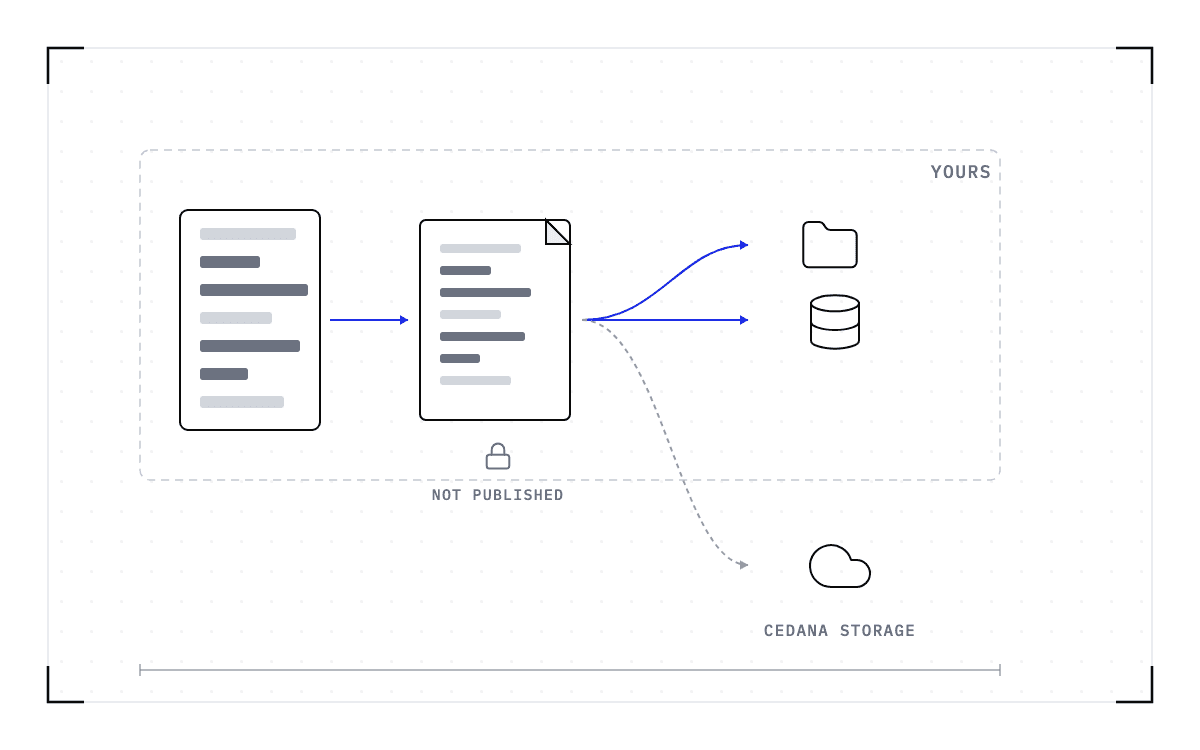
The value is a unique label for that workload's checkpoints, so once you have applied it, every subsequent application of that yaml starts the container from the latest snapshot taken for that ID. A job that fails or is preempted then picks up from the checkpoint rather than from the beginning.
For a CPU workload that is the whole change, because no additional configuration is required. A GPU workload needs one more field on the pod, runtimeClassName: cedana, and runs with the nvidia-container-toolkit. Everything else in the GPU example we document is ordinary Kubernetes, meaning an image, a command, an init container that clones a repository, a volume mount, and a GPU request under resources.
Slurm opts in with #SBATCH --export=CEDANA_ENABLE=1 and needs no additional configuration for a GPU workload; Kubernetes opts in with CEDANA_CHECKPOINT and adds runtimeClassName: cedana for a GPU workload; on both, nothing in the application is touched.
The per-workload opt-in
Nothing in the application is touched, on either scheduler.
The diff is small because Cedana attaches to the scheduler and the runtime
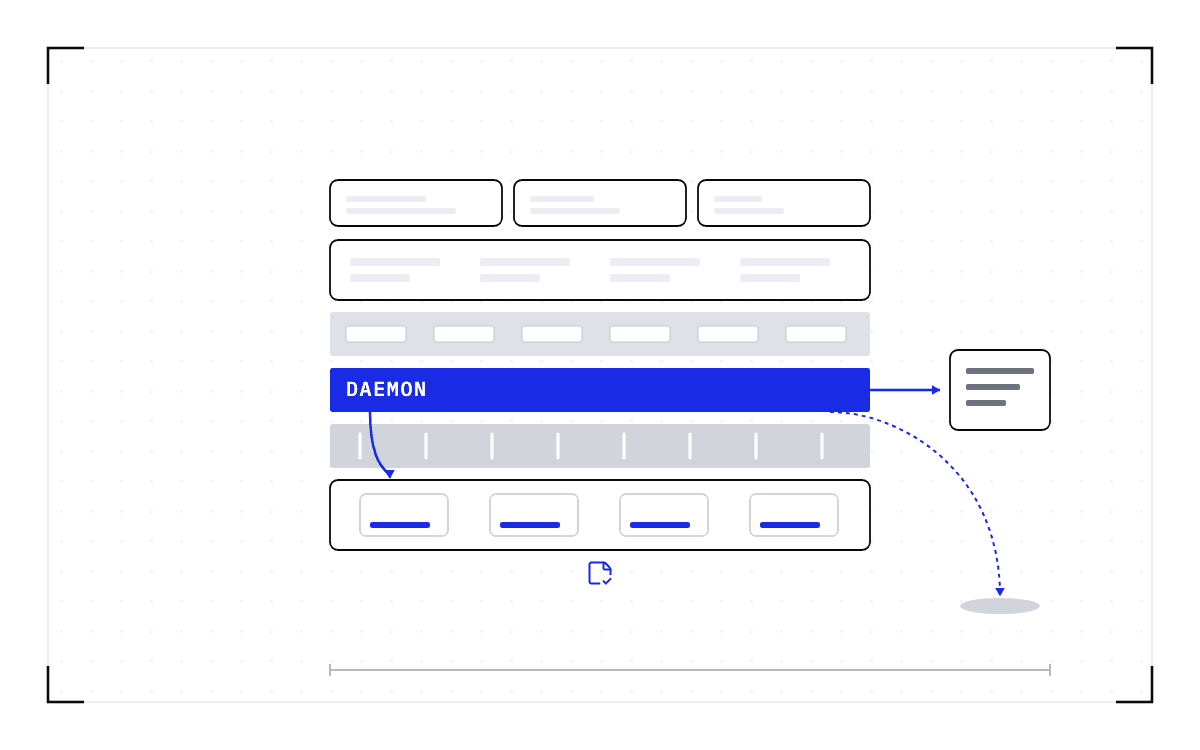
Cedana is a daemon that does the capture, a plugin per runtime and scheduler that keeps the capture invisible to the user, and a control plane that decides when to act. It attaches to the runtime and the scheduler rather than to the application, so the change lands in slurm.conf and in a pod spec instead of in a training loop. The researcher submitting a job never learns a Cedana command.
A boundary: above it the application, holding a researcher's code, a training loop, a serving engine and a Dockerfile; below it the scheduler with slurm.conf and the runtime with a pod spec.
Where the change lands
The two files that change sit below the boundary; the four things in the application sit above it.
The plugin sits on the scheduler's own extension points and intercepts the job's launch, so the capture needs nothing from the application. That is why installing Cedana replaces nothing you already run and modifies no application code, and the diffs above are what that claim looks like on a real cluster.
Everything a change-control review needs is already published
Every command and configuration line above comes from our documentation, so you can check each one against your own cluster before you agree to anything. The review in front of you covers the install and the scheduler's configuration, and a researcher's code, a training loop, a serving engine, and a Dockerfile all sit outside it, because the capture happens below them.
So what you are approving is one installation that puts GPU checkpointing under every job on your cluster, rather than a checkpoint path written and maintained inside each application that needs one. After that, a job opts in with one environment variable, and the checkpoint comes from the scheduler instead of from code somebody has to keep working.
Common questions
What changes on my cluster when I install Cedana?
Installing GPU checkpointing on a Kubernetes or Slurm cluster makes three changes. They are the cluster install, the scheduler's configuration, and the settings on each workload that opts in. Those settings include one environment variable and, for GPU pods, a runtime class. Nothing in the application is touched.
How does Cedana work?
Cedana is a daemon that does the capture, a plugin per runtime and scheduler that keeps the capture invisible to the user, and a control plane that decides when to act. It attaches to the runtime and the scheduler rather than to the application. That is why the change lands in slurm.conf and in a pod spec instead of in a training loop.