TL;DR
- You have a kernel update to apply to nodes that still have jobs on them, and a reboot stops those jobs. A job is a set of processes on that machine, and a GPU workload's state lives in GPU memory.
- Slurm's own answers all work by emptying the node first.
scontrol reboot ASAPdrains the node and waits for the longest job on it to finish. A Slurm maintenance reservation keeps the window clear by starting no job that would still be running when it opens. - So the posted maintenance hours are the smallest of the costs. The cluster runs at falling utilization for days before the window, and anything still running when the nodes go down has to be computed again afterwards.
- If the jobs are checkpointed before the reboot and restored after it, the nodes have to be empty only for the window itself. So the reservation can start close to the window instead of weeks ahead.
- In this piece we walk through whether a running job can survive a reboot, what
scontrol rebootand a maintenance reservation do, why the cluster empties for days beforehand, and how to measure what that costs on your cluster. The second half covers why a requeue does not save the job, and what changes when the job can be checkpointed first.
Can a running job survive the reboot?
No, a reboot stops the running job. A job is a set of running processes on that node, and a GPU workload's state lives in GPU memory, so the reboot ends both. Unless the application saved its own state somewhere it can find and reload it, the next run begins at the first line of the batch script, and the hours already spent have to be run a second time.
One Slurm administrator asked on Reddit how to reboot all nodes after a Linux kernel update without losing any jobs, and the same question reaches Stack Overflow in a shorter form, where the answer is "To strictly answer the question; no they cannot."
Every published procedure for a kernel update is therefore a way of arranging the cluster so that nothing is running on a node when it goes down.
What do scontrol reboot and a maintenance reservation do today?
Slurm has tooling built for exactly this job, and all of it works by emptying the node first.
scontrol reboot ASAP nextstate=RESUME handles a node at a time. ASAP drains the node, so no new job starts on it. Slurm then waits for the jobs already running there to finish, reboots the node, and nextstate=RESUME returns it to service. Nothing is killed.
What you pay for that is the wait. The node takes no new jobs from the moment the drain begins until the last job on it ends, and how long that is depends on the longest job it happens to be holding. Its GPUs go idle one job at a time as those jobs finish.
A maintenance reservation applies to a set of nodes at a stated time, and Slurm's reservations documentation explains how the scheduler keeps that time clear: "As the reservation time approaches, only jobs that can complete by the reservation time will be initiated."
Administrators on the Slurm users list have preferred the reservation for years, because a reservation lets you define a specific maintenance period well ahead of time. That is the answer in "Reservation vs. Draining for Maintenance?" from August 2020, and the same question came back to the list in June 2026.
The rolling reboot is the third pattern, N nodes at a time, so the rest of the cluster keeps working while the update moves through it.
SchedMD's upgrade guide describes an exception for daemon upgrades: "Upgrades will not interrupt running jobs as long as SlurmdTimeout is not reached during the process." That sentence is about restarting Slurm's own daemons inside a timeout, so it does not cover a kernel update, because there the machine underneath the daemon goes down and takes the jobs with it.
The three reboot patterns all empty the node first by waiting for running jobs to finish. The daemon upgrade is the exception, and it never touches the kernel.
Can reboots run on a schedule without disrupting the jobs?
They can, but the schedule waits for the jobs in the same way a one-off reboot does. One administrator on r/HPC wanted periodic restarts of the nodes for a memory leak they had not yet found, checking each node as it went idle, and the answer given was the command above, scontrol reboot ASAP nextstate=RESUME, run on a schedule. Every repetition works the same way: drain, wait for the running jobs to finish, reboot, return. A nightly restart therefore costs whatever the longest job on each node costs in waiting, every night.
With the jobs checkpointed first, the schedule can run at the hour you set: save the jobs, reboot, restore them on the same nodes, and the wait for the longest job disappears.
Why does the cluster empty for days before the window?
The cluster starts emptying once the reservation is in place, which is usually long before anyone reboots anything. From then on, a job can start only if its declared time limit ends before the window opens, so the closer the window gets, the shorter a job has to be to start at all. Short jobs still run in the gap, and a job whose declared time limit would carry it past the start of the reservation waits until the reservation has passed. Asking for a shorter limit lets it start sooner.
Your users run that arithmetic without being asked to. A job that needs 3 days, submitted 2 days before the window, does not fit, so Slurm holds it until the reservation has passed, and a user who does not know the rule sees a job that sits in the queue for days. Waiting until after the window costs that user the delay and nothing else, and administrators at one university cluster report that some of their users hold their submissions until the window has finished rather than risk it.
A job that was already running when the reservation was created is a separate case, because the reservation itself does not kill it. The reservation and the backfill rules, which let the scheduler start a job early in a gap only when doing so will not delay higher-priority work, prevent new jobs from being admitted across the maintenance window, but they do nothing about the work already under way. That work may require a separate administrator drain or cancellation before a reboot, and if you cancel it or reboot its node before it finishes, its unsaved work is lost.
How early the reservation is set determines how long the cluster runs with reduced utilization. One Fortune 100 pharma research cluster sets its Slurm reservation more than 2 weeks before maintenance so that no job can extend into the window, and every job long enough to matter is held from that point onward. Administrators at one supercomputing center report that utilization on their cluster starts falling about 2 days before their monthly window. Both figures are the sites' own.
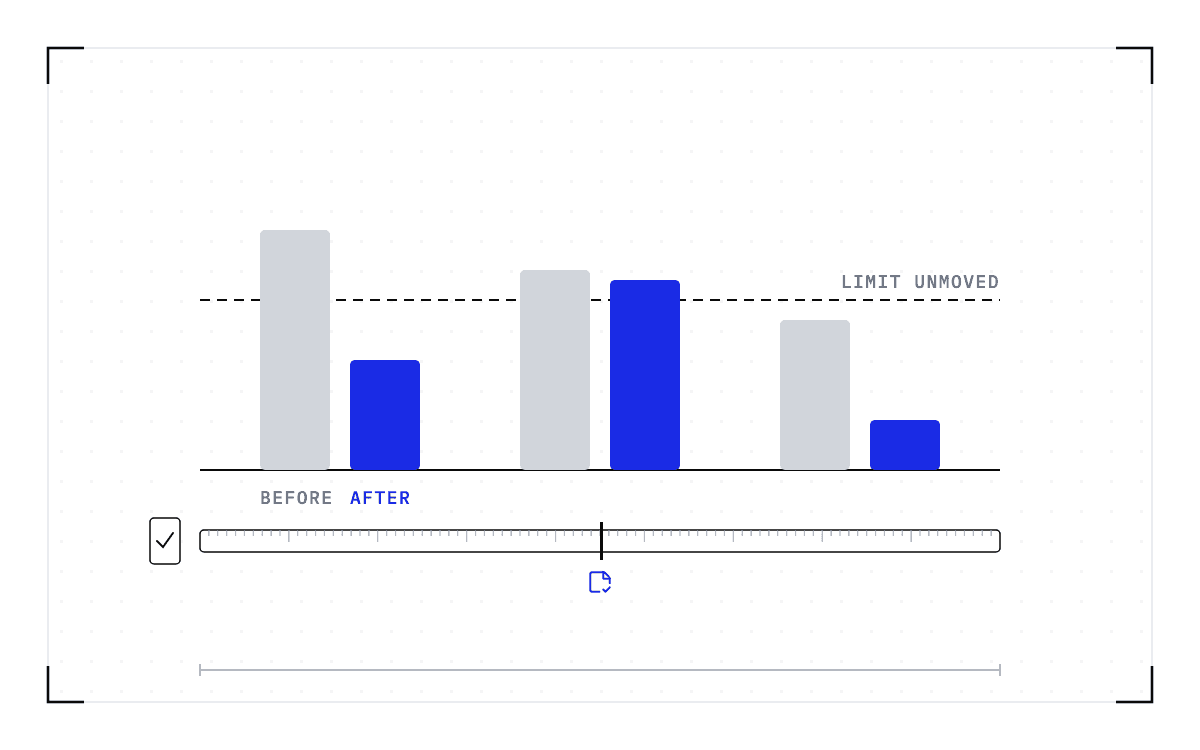
The posted hours are the smallest of three costs. Before the window, the cluster runs at falling utilization while the long jobs remain queued. After it, whatever was still running when the nodes went down has to be computed again.
A 4-hour window with a reservation set 3 days ahead, to take an illustration rather than a measurement, holds every long job for those 72 hours and leaves the GPUs increasingly idle as the window approaches. A job 4 days into a run at 90% utilization loses all of that to recomputation. Count the two losses separately, because idle nodes are capacity that was available and went unused, while the recomputed days are work you paid for twice.
Three bars on an axis in days: a 4-hour posted window against a 72-hour hold on every long job and 4 days lost to recomputation.
The three costs of a window
The posted hours are 4 hours, the hold on long jobs 72 hours, and the recomputed run 4 days.
an illustration rather than a measurement
How do I measure what the wait costs on my cluster?
Your accounting data already holds most of the answer, so you need no new instrumentation. Slurm's sacct interface reports job state, submission and start times, time limits, and the resources each job was allocated. That is enough to compare the days before a window against an ordinary week.
- List the last three maintenance windows, with the date and time each one opened.
- Pull the accounting records for the days before each window, and for a week with no window in it as a baseline.
- Compare submissions per day and node occupancy per day across the two. The difference is your estimate of the drain.
- Count the pending jobs whose requested time limit would have crossed the reservation, and add up the GPU-hours they asked for. Those are the jobs the reservation held back.
- Add the jobs that were running when the window opened. For each one, the time since its last saved state, times the GPUs it held, is the work that gets computed a second time. If the accounting cannot show the last save, the elapsed GPU-hours are the ceiling, not the loss.
Treat the drain figure as a floor. Accounting data records what was submitted and what was killed, and it cannot record the job a researcher decided not to submit at all.
Does a requeue not already save the job?
A requeue puts the job back in the queue and does nothing at all about the hours it had already run. Slurm's sbatch documentation says so in one sentence: "When a job is requeued, the batch script is initiated from its beginning." The same page names the events that requeue a job, which are an administrator requeuing the job, a node failure, and preemption by a higher-priority job.
Whether the job picks up where it left off is decided by the program inside it. If the application does not find and load a valid checkpoint of its own, the requeue is a restart, and the reboot cost the cluster every hour that job had accumulated.
That is why reservations go in weeks ahead. When an interrupted job is a lost job, the only safe policy available to you is to make sure no job is ever interrupted.
What changes if the job can be checkpointed before the reboot?
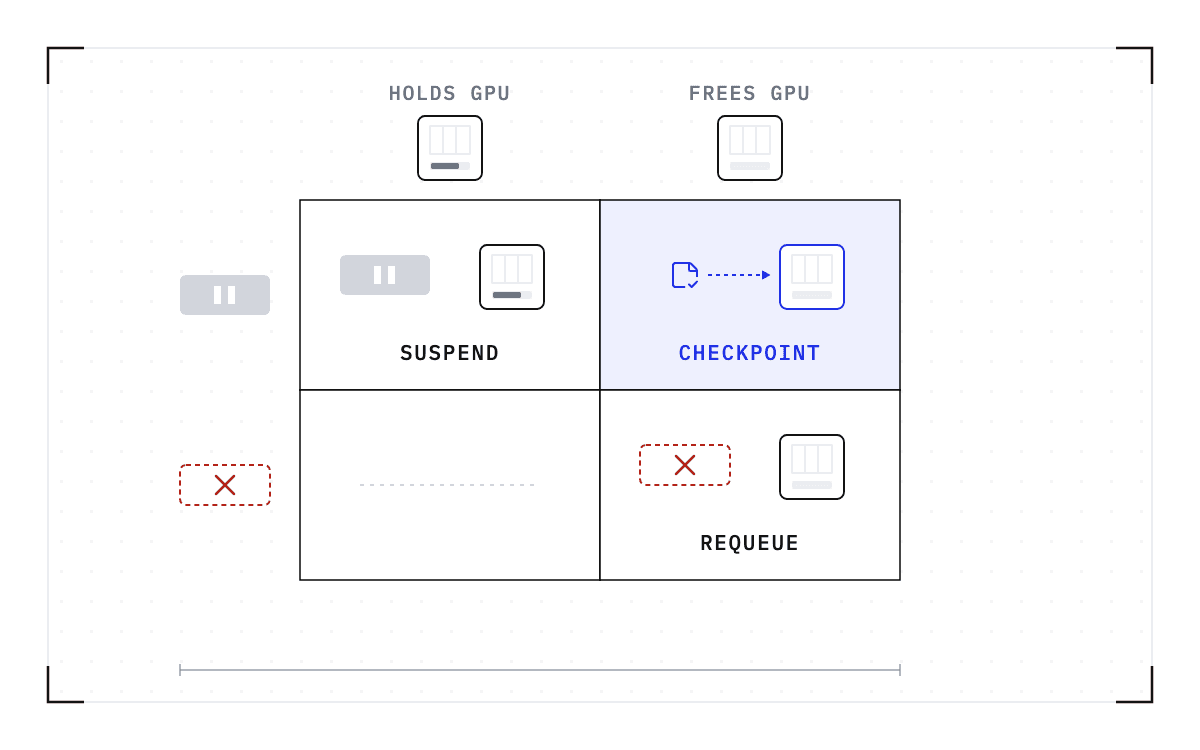
Saving the full state of a running job so that it can be brought back later is called checkpointing. Checkpointing below the application captures the running process from the outside, so the program needs no checkpoint code of its own and the job does not have to die at the window.
At a reboot the same sequence runs as when a job reaches its own time limit: capture the state below the application, release the allocation so the nodes go back to the pool, requeue the job, and restore it on a compatible node once the update is done. That is what Cedana's Slurm integration does automatically, with no application code changes and no checkpoint path written for the program, so it covers the workloads we support that have no checkpoint path of their own. The steps are the ones we document for automatic checkpoint and restore with Slurm.
The reboot itself does not change. What changes is when the nodes have to be emptied, because a job can now run until shortly before the window and come back after it. The reservation can then start close to the window instead of weeks ahead, avoiding those days of low utilization before maintenance.
Rolling maintenance gets easier for the same reason. Once the work on a node can be moved off it, you can drain one node, patch it, return it to service, and start on the next one.
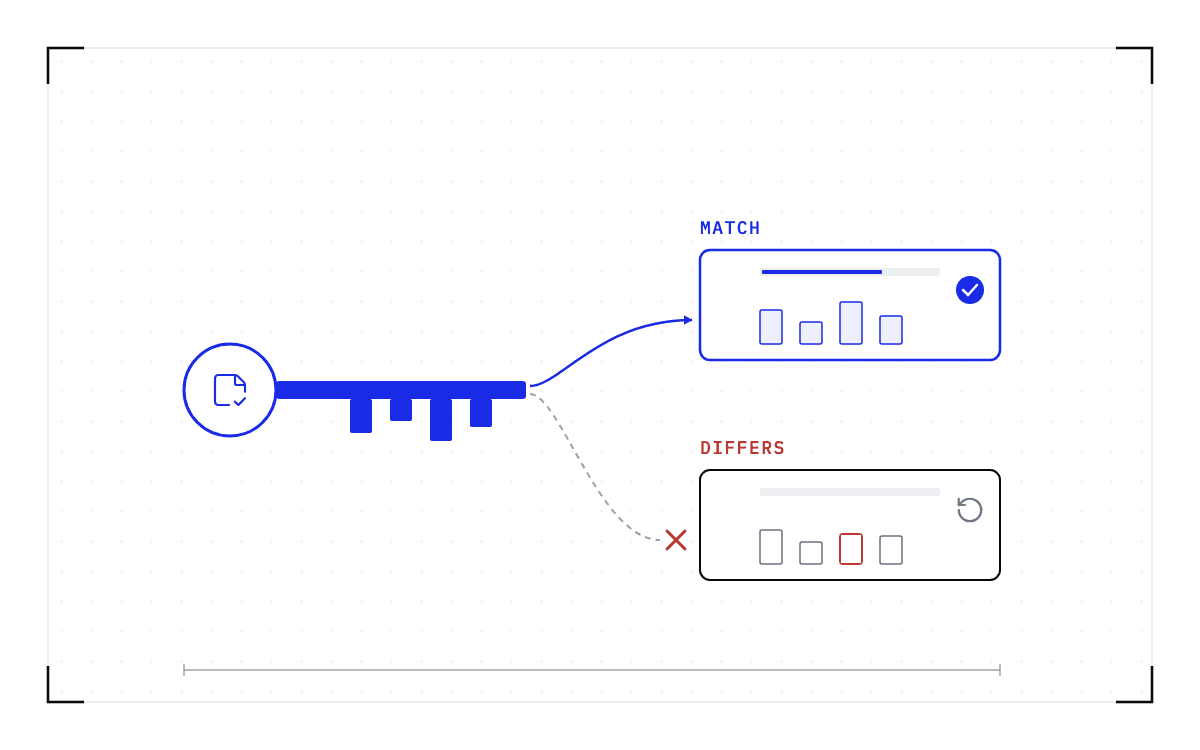
The restore has to land on a compatible node. A checkpoint records the GPU, driver, engine and model versions it was taken against. If any of them changes, the checkpoint is invalid and the workload cold-starts instead.
A driver or CUDA upgrade therefore changes where the jobs come back. After a kernel update the job can return to the same node, but a checkpoint taken on the old driver cannot be restored on the new one, so those jobs go to nodes still on the old version. Checkpoint the jobs on the node, resume them on compatible nodes that are not being upgraded, do the upgrade, and return the node to the pool.
Resuming those jobs needs nodes left on the old driver to receive them, so the upgrade moves through the cluster in groups. The jobs still running when the last group goes either finish first or cold-start on the new driver.
For a kernel update, the window costs a checkpoint and a requeue instead of days of idle nodes and work that has to be run again. Cedana is automated GPU checkpointing and migration infrastructure that increases the useful work your GPUs deliver. On a maintenance window, that means the running job is saved below the application before the nodes go down and brought back afterwards. You can then set the reservation for the length of the maintenance itself, and your users can keep submitting long jobs until it opens.
Related:
- Draining a GPU node in Kubernetes without losing the work on it
- Why an NVIDIA GPU Operator upgrade waits for your workloads
- Patch the GPU cluster on the security calendar, not the job calendar
- Driver, CUDA, and engine upgrades with workloads running, and the one limit
- Measuring the cost of wall-time termination from your sacct data
- A 90-day wall-time PoC: what to measure before you change policy
Common questions
Can a running Slurm job survive a reboot?
No, a reboot stops the running job, because the job is a set of processes on that node and a GPU workload's state lives in GPU memory. Unless the application saved and reloaded its own state, the next run begins at the first line of the batch script. Checkpointing the job below the application before the reboot and restoring it on a compatible node afterwards is what gets it through instead.
Should I use a maintenance reservation or just drain the nodes, and how far ahead should I set it?
Use a reservation, because as the reservation time approaches Slurm starts only the jobs that can complete by that time, which keeps the window clear if you set it well ahead. One Fortune 100 pharma research cluster sets its reservation more than 2 weeks before maintenance so that no job can extend into the window. With the jobs checkpointed before the reboot and restored on compatible nodes afterwards, the reservation can start close to the window instead.